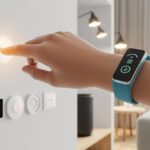
Smartwatches feel like tiny wizards on your wrist. Instead of pulling rabbits out of hats, they turn off your lights or lock your doors.
These clever little gadgets started by counting our steps, but now they help us run our whole living spaces. We get to feel futuristic without buying a robot butler.
If you’ve ever been way too comfortable on the couch to get up and dim the lights, you know why these watches are lifesavers.
But not every smartwatch gets along with every smart home device. Some only work with certain brands, while others act like your hallway lights don’t exist.
It’s smart to check battery life, too. Nothing kills the mood faster than your watch dying just as you try to set the lights low.
Look out for which smart home platforms the watch supports—Alexa, Google Assistant, Apple HomeKit, that sort of thing.
And the screen matters. Nobody wants to squint at their wrist just to find the “movie night” scene.
With the wrong watch, you might end up waving at your lights and hoping for the best.
We tried a bunch of smartwatches to find the ones that actually make smart home control as easy as pressing a button. Because honestly, that’s all we want.
Best Smartwatches for Smart Home Control
We finally get to control our homes from our wrists, just like in those old sci-fi movies.
Let’s check out the best smartwatches that make us feel like wizards—no magic wands required.
BOOOMIC Alexa Smartwatch

If you want a pink BOOOMIC smartwatch that answers to Alexa and keeps tabs on your day (and your heart), this one’s ready to help.
Pros
- On-wrist Alexa gives off secret agent vibes
- Bluetooth calls and message alerts mean less phone digging
- So many workout modes, you’ll run out of excuses
Cons
- Not everyone loves a square screen
- Camera control feels a bit clunky
- All those features can get overwhelming at first
Setting it up took barely any time. We even double-checked to see if we skipped a step.
The 1.83-inch display stays bright, even out in the sun. Sunburn not included.
Alexa sits just a tap away. We barked commands about weather, news, and alarms—all without touching our phones. Honestly, that’s peak lazy, and we’re here for it.
Bluetooth calling surprised us by being genuinely useful. Our phones stayed buried in bags or lost in the couch, but calls still came through.
Message notifications pop up on the big screen, so we don’t fall into the doomscroll trap “just for one text.”
For health and fitness, this watch might be a little too eager. There are so many sports modes, we finally ran out of excuses and had to surrender to the yoga mat.
It tracks sleep, heart rate, and stress around the clock. It even survived a splash or two by the kitchen sink, thanks to its waterproofing.
If you want Alexa, calls, and notifications on your wrist—with a nudge to move more—this BOOOMIC smartwatch checks the boxes and might even set your alarms for you.
Motast Smart Watch

If you want a feature-packed smartwatch for home control and fitness without spending a fortune, this one’s a solid bet.
Pros
- Make and take calls right from your wrist—no more frantic pocket patting.
- The giant HD display makes our tired eyes feel young again.
- Battery lasts so long we actually forget where the charger is.
Cons
- The app is confusing enough to make us question our life choices.
- Step tracking sometimes acts like our legs are imaginary.
- Customization options will eat up your afternoon.
Every time we use the Motast Smart Watch, we’re amazed by how easy it is to answer a call or check a notification while fiddling with smart home lights.
It makes us look busy, even when we’re just turning up the thermostat from bed.
The big, bright screen saves us from squinting, and swapping the watch face is almost too much fun.
Tracking fitness? There are more sports modes than we have equipment for—seriously, we lost count at 100.
It even reminds us to get up when we’ve been sitting too long, which happens a lot during TV marathons.
Water-resistance means we can wash our hands and survive a rainstorm, but we’re not dunking it in the hot tub.
The app, though, is a headache. We spent too long figuring it out, and some fitness stats left us scratching our heads (maybe we walk in another dimension).
Still, if you want loads of features without emptying your wallet, the Motast Smart Watch is a smart pick for both smart home fans and accidental athletes.
Othalne Smartwatch

If you want a smartwatch that covers smart home basics, daily health, and a bit of style—without skipping your morning coffee to afford it—this one’s worth a look.
Pros
- Call and message alerts feel like having a personal assistant
- Tracks workouts and sleep, even if we only leave the couch for snacks
- High-def screen and customizable faces keep things fun
Cons
- Step tracking gets a little dramatic (blink and you gain twenty steps)
- No way to text back, so you still need your phone for gossip
- Syncing health data with some smart home apps takes extra effort
Right away, we noticed how easily the Othalne Smartwatch kept us in the loop with calls and notifications—no more couch diving for the phone just to see if it’s mom or spam.
We spent a good hour messing with the screen, swapping the watch face from “mildly professional” to “cat astronaut” without any judgment from the watch.
Fitness tracking had us convinced we walked a marathon just by pacing around the kitchen. It cheers us on for every step—accurate or not—so maybe take the numbers with a grain of salt.
We liked the health tools, especially when trying to out-sleep our pets.
Connecting it with smart home gear didn’t cause trouble, but syncing every detail between apps took more patience than we’d like.
The battery lasted long enough that we lost track of the charger. If you want big smartwatch features with a little flair and some humility, this one gives you plenty to play with.
BOOOMIC Smart Watch with Alexa Built-in

If you want hands-free smart home control without breaking the bank, this little BOOOMIC gets the job done—sometimes with a friendly nudge.
Pros
- Built-in Alexa lets us boss around our smart home gadgets right from our wrist.
- Calls, messages, and reminders show up while we’re pretending to work out or actually working out.
- Budget-friendly, so we don’t have to live on instant noodles.
Cons
- Bluetooth connection likes to play hide and seek with our phone.
- Watch faces aren’t as customizable as we hoped.
- Some features feel a bit unfinished.
We’re always hunting for a smartwatch that makes us feel like secret agents. This BOOOMIC delivers, especially with Alexa just a shout away.
Talking to the watch and controlling lights or asking about the weather quickly became a favorite party trick, even if the dog didn’t care.
Messaging and call features made life easier when our phones disappeared under laundry or into couch cushions.
Health tracking runs nonstop, and we got a little competitive with ourselves for steps and sleep. We’re not running marathons, but the watch is ready if we ever get inspired.
Staying connected wasn’t always perfect, and sometimes we wanted fancier watch faces. At this price, though, we’ll forgive an off day—just like we forgive ourselves for skipping leg day.
If your home is already smart, this watch might just give you the motivation to catch up.
Matast Smart Watch Deep Black

Looking for a solid, affordable smart home sidekick? The Matast Smart Watch might be our new favorite workout buddy—or at least the chattiest one on the block.
Pros
- We can take Bluetooth calls even when our phone’s somewhere under a laundry pile.
- Tons of sports and health features—our lazy days might be in trouble.
- Huge variety of watch faces; finally, we can match our mood (or outfit).
Cons
- No built-in GPS, so don’t let us get lost out there.
- User interface sometimes acts like it’s had a rough morning.
- Smart home controls depend on connected apps, so not every gadget wants to play.
Answering calls from the couch or garden feels surprisingly satisfying. We can ignore group chats or catch up with friends without ever touching our phones.
Message alerts from all our social apps keep us in the loop, even when our phone has gone missing. Switching watch faces is almost too much fun, and with so many options, we sometimes get distracted just picking one.
The touchscreen responds quickly, and the visuals are a lot better than we expected for this price. It’s so light, we barely notice it’s on.
For smart home control, this isn’t exactly a universal remote, but it works if we’ve got the right apps. We can control music, set weather alerts, and track our steps while yelling at the robot vacuum.
The health and activity features come in handy. The heart rate and sleep trackers finally give us proof that, yes, we do need a nap.
We wish the interface ran a bit smoother, and syncing all our smart gadgets took some patience. There’s no built-in GPS, so if we wander too far during a run, we’ll need to bring our phones along.
Still, for a budget-friendly smartwatch that handles a bit of everything and lets us manage life from our wrist, the Matast Smart Watch Deep Black feels like a solid pick.
JeeJTek Silver+Blue Smartwatch

If we want a budget smartwatch that actually lets us control smart home stuff and send texts without digging out our phone, this one deserves a look.
Pros
- Answer and make calls right from the wrist.
- Handy AI voice assistant for those lazy moments.
- Battery life that doesn’t make us anxious.
Cons
- Quick reply works only on Android (sorry, iPhone folks).
- Build materials aren’t exactly premium.
- Some features take a bit of fiddling to set up.
Setting up the JeeJTek Silver+Blue Smartwatch feels refreshingly simple—no need for a manual thicker than a school textbook. Bluetooth calls come through loud and clear, even when we’re multitasking or herding pets off the furniture.
Notifications give us a gentle nudge, and the quick reply on Android is a real time-saver when we don’t feel like typing on a tiny screen. The built-in AI voice assistant actually hears us better than most people in our house.
Turning lights on or off with just our voice has become weirdly normal. Maybe we should just ditch light switches altogether. The waterproof rating means we can wash dishes or jog in the rain without treating our watch like it’s made of tissue paper.
It’s not perfect. iPhone users miss out on instant replies, and the watch body won’t win any style awards. Some settings left us scratching our heads, but once everything’s dialed in, it just works—like a helpful friend disguised as a watch.
Mikego Alexa Smartwatch

Want to control your smart home with a budget-friendly gadget that listens better than most kids? The Mikego Alexa Smartwatch is worth checking out.
Pros
- Voice control lets us play DJ or check the weather without lifting a finger.
- Big, clear screen that’s easy to read—even before coffee.
- Packed with handy tricks, from fitness to sleep tracking.
Cons
- Can’t reply to messages—cue the silent frustration.
- Not meant for deep-sea adventures or wild water fights.
- App selection feels a bit limited if we’re picky about tech.
Right out of the box, this smartwatch wants to show off. Alexa is built-in, so talking to our wrist and controlling smart lights becomes a daily routine.
We started setting reminders and checking the weather without touching our phone—or admitting we forgot to check before leaving the house. Swiping through the 1.83-inch screen feels good, thanks to the sharp display and clean design.
Customizing the watch face was more fun than expected. There’s an option for every mood, whether it’s a workday or workout. It even boasts over 100 sports modes, which is about 97 more than we’ll ever use, but hey, options are nice.
Making calls and getting notifications on our wrist gives us a bit of a spy vibe (if spies also count their steps). We noticed we can’t reply to texts, which isn’t a deal-breaker for us, but some folks might care.
The waterproofing handles daily life, but it’s not ready for a swim meet. For the price, we get all the basics for smart home commands, exercise, sleep tracking, and more.
If we don’t need a flashy brand but want genuinely useful features, the Mikego Alexa Smartwatch is a smart find for our routines.
Quican Smartwatch with Alexa

If we want to run our smart home from our wrist without spending a fortune, this is a solid pick with plenty of perks and just a few quirks.
Pros
- Alexa built-in makes home control feel like sci-fi.
- Wide phone compatibility—even our old devices didn’t complain.
- Customizable watch faces for every mood swing.
Cons
- No emoji support in messages (our sarcasm just doesn’t land).
- Can’t reply to messages—so much for witty banter.
- Magnetic charger can be a bit temperamental (like our cat).
We took the Quican Smartwatch for a spin, and the built-in Alexa quickly became our favorite sidekick for running the show at home.
We checked the weather while still in bed, barked out reminders, and even dimmed the living room lights—no need to dash for the wall switch. The watch handled our fitness routines with surprising accuracy.
Whether we were pretending to enjoy yoga or just counting steps to the fridge, the trackers kept up. Swapping between more than a hundred watch faces was almost too much fun; we changed styles more often than socks.
There are some caveats. We missed being able to reply to texts from the wrist, and no emojis meant our jokes fell flat.
The charger sometimes needed a little wiggling to work. For a reasonable price, though, the Quican gives us most of what we want in a smartwatch—without making us study a whole new language to set it up.
Jacoosa Smart Watch 1.85″ HD

Want to feel like a secret agent running your smart home from your wrist? This gadget gets us pretty close—with a few quirks tossed in.
Pros
- Answer and make calls via Bluetooth—finally, we can look important at dinner.
- Crisp, easy-to-read HD screen that doesn’t make us squint.
- Tons of sports modes—way more than we’ll ever use.
Cons
- Figuring out all the settings can feel like cracking a safe.
- Some features rely on the Da Fit app, which doesn’t always play nice with every phone.
- Sometimes notifications don’t show up right away.
The Jacoosa Smart Watch caught our eye right away with its bright 1.85″ HD screen. It’s sharp and clear, even when we’re stumbling around before coffee.
Calling or answering straight from the watch felt like a power move—definitely gave us secret agent vibes. The built-in voice assistant handles basics like music or reminders, but getting it to trigger smart lights takes some patience and a few extra taps.
We still appreciated the convenience, especially when we needed to find our phone or control music with messy hands. The Da Fit app threw us a bit of a learning curve.
If we ever write our own instructions, we’ll add more pictures and less guesswork. The waterproofing makes it easy to keep the watch on all day, but we learned the hard way that full-on swims are best left to our rubber ducky.
This watch is a budget-friendly option for the tech-curious who like mixing fitness, fun, and a little challenge.
QONBINK Smart Watch

Need a no-nonsense smartwatch that doesn’t wreck your budget and actually helps wrangle your smart home? This one might be worth a look.
Pros
- Custom watch faces let you show off your own questionable sense of style
- Handles calls and messages, so you can ignore people straight from your wrist
- Lasts for days on a single charge—even if you forget where you tossed the charger
Cons
- The app is necessary for almost everything, so hopefully you don’t mind downloading another one
- The band feels kind of flimsy, which isn’t going to win any durability awards
- Manuals could use some love (unless you’re into solving little puzzles)
Setting up the QONBINK watch felt pretty straightforward. Even if you’ve forgotten every password you’ve ever made, you’ll probably get through it.
We got it working with both iPhones and Android phones. That made everyone in the house happy—well, until someone had to decide who actually got to keep it.
Bluetooth stayed solid when we tried out smart home routines. Calls and texts popped up with no trouble, which honestly made us feel a bit like secret agents.
The display looks sharp. Whether you’re checking your heart rate or showing off a goofy cat photo as your watch face, it’s clear and bright.
We wouldn’t take this thing scuba diving. Still, it handles sweat and rain just fine, so you don’t need to worry about the weather.
If only the instruction manual made as much sense as the rest of the device. For everyday smart home tasks and some bonus fitness tracking, this watch helps us feel a little more put-together—even if we’re panic-cleaning before guests show up.
Buying Guide
Let’s be honest, we all want our smartwatches to do everything—well, maybe not make coffee, but close. When it comes to smart home control, picking the right watch can feel like you’re solving a puzzle nobody gave you the pieces for.
Honestly, it doesn’t have to be that complicated. If you want a smooth home control experience, look for voice assistant support.
If your watch talks to your lights, locks, or even that stubborn robot vacuum, built-in voice help can really save you from endless button-mashing.
You should also check for compatibility. Make sure your new watch works with the smart devices you already own.
Before you buy, double-check which platforms the watch connects with. Some watches play nice with everything, but others? Not so much.
Here’s a quick comparison table of important features:
| Feature | Why It Matters |
|---|---|
| Voice Control | Hands-free home commands |
| App Integration | Controls many smart devices |
| Notifications | Get alerts from smart devices |
| Battery Life | More control time, less charging |
| Water Resistance | Survives kitchen mishaps |
Ease of use really matters. If you can’t figure out the controls, you’ll probably just end up yelling at the toaster again.
Think about display size and clarity too. Big, easy-to-read screens help if you don’t want to squint every time you turn on a lamp.
And don’t forget comfort. If a watch feels like a brick strapped to your wrist, you’ll probably ditch it faster than you gave up on your old thermostat.

From a young age, I have always had a big interest in technology, and this blog is an extension of that interest. Through this blog, I hope to provide others with all of the information they need regarding tech options to consider, and things such as compatibility. Some of the different items I will be discussing include headphones, smartwatches, and how to fix common issues.
- How to use a fitness tracker for sedentary alerts: Because Your Couch Won’t Miss You Anyway - September 14, 2026
- Why do my Bluetooth headphones not work with my projector? Solving Tech Mysteries for the Audio-Challenged - September 13, 2026
- Best Smartwatches for Medication Reminders: Never Forget Your Pills (or Your Sanity) Again - September 13, 2026
Related Posts: