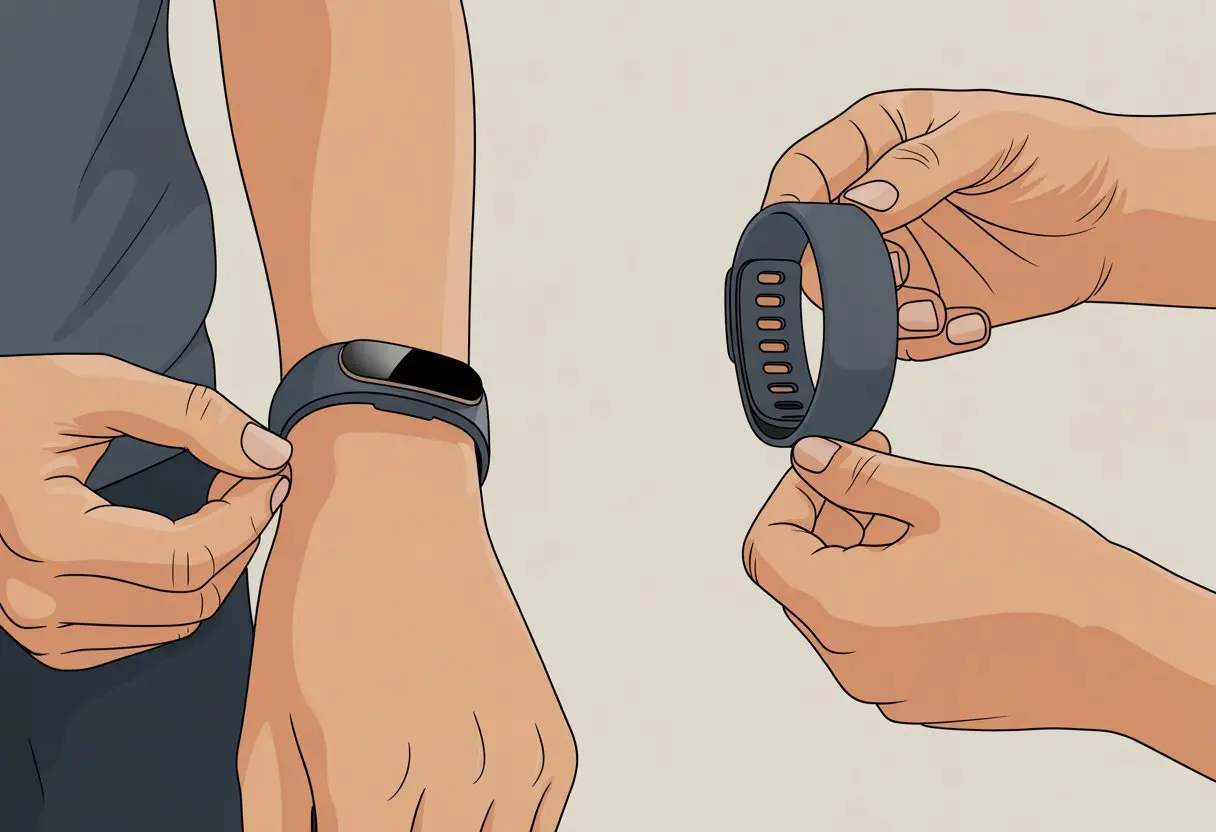
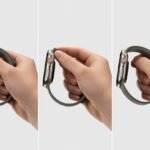
Let’s be honest—our fitness trackers and smartwatches basically live on our wrists now, way more than old-school watches ever did. Sometimes they need a style refresh (or just a good scrub). Swapping the band? Way less stressful than you’d think. You don’t need a tech degree or a toolkit—just find the latch or button on the back of your device and slide the band off.
Ever feel like your tracker’s begging for a fresh look or a comfier strap? Same here. Changing the band keeps things looking sharp and helps us dodge those weird tan lines.
If you’ve ever struggled with a stubborn strap, don’t sweat it—we’ll walk through how to make it painless, no band meltdowns required.
Ready to shake things up and level up your wrist game? Learning to swap bands is almost as satisfying as nailing your step goal. And if you get stuck, there are plenty of quick guides out there, like this Fitbit Versa band change walkthrough, that make the process even less intimidating.
Safety and Preparation
Before we ask our fitness tracker to do any gymnastics, let’s get ready. A smooth band swap starts with a few basics.
Let’s set ourselves up for success and avoid a disaster that would embarrass even the bravest little gadget.
Power Off and Unpair
First things first: let’s not give our tracker a chance to freak out. We’ll turn off the device before poking at those tiny bands.
Your battery will thank you, and so will your nerves. If your tracker uses Bluetooth, it’s smart to unpair it from your phone so there’s no weird syncing or lost data while you work.
Trying to fix electronics while they’re on? That’s a recipe for disaster—unless you’re into fried circuits. Let’s keep this simple.
If your tracker is under warranty, check the paperwork. Some warranties actually require you to switch bands while powered off, because nobody wants a denied claim over a two-second shortcut.
Workstation Setup
Let’s build our workspace like band-changing pros. You’ll want a flat surface—not the edge of a counter, please.
A soft towel or cloth on the table helps keep your gadget scratch-free and catches runaway screws. Gather your tools: a small screwdriver (if needed), maybe a paperclip for those sneaky spring bars, and tissues for any drama.
Keep pets, food, and drinks at arm’s length. Spilled coffee won’t help. Good lighting is a must—shadows hiding a spring pin are the enemy.
If you’re a checklist fan, here’s a quick one:
Towel or soft mat
Tools (screwdriver, paperclip, etc.)
Bright lighting
Patience and a good mood
Handle With Care
We love our trackers—so let’s not treat them like the remote we’re always losing. When you remove the band, hold the device firmly but don’t crush it.
Those release pins and latches won’t survive brute force. If you meet resistance, pause and try again.
Forcing parts can damage the electronics or ruin the fit. Cosmetic scratches aren’t just ugly—they might void your warranty if the support team gets picky.
If your tracker has delicate connectors, only touch the plastic or rubber bits. Keep metal away from open ports—nobody wants a shorted Bluetooth chip.
A little caution saves a lot of headaches.
Understanding Your Fitness Tracker Design
Before we start wrestling with wristbands, let’s get familiar with how our fitness trackers and smartwatches are put together.
Knowing how your device attaches bands (and what it’s made of) saves you a ton of confusion—and maybe a broken nail or two.
Identifying Band Attachment Types
Fitness trackers and smartwatches use different methods to attach their wristbands. Some have classic spring bars, while others use a push-button release or a special pin system.
You’ll usually see one of these:
Band Attachment Type
How It Works
Common Devices
Classic Spring Bar
Small bar with spring-loaded ends
Older activity trackers
Quick-Release Pin
Small lever that slides to unlock the band
Many newer models
Proprietary Clip/Pin
Custom mechanism, usually a slide or snap
Brand-specific models
If your device still has a spring bar, it’s either a vintage gem or overdue for an upgrade. Most newer smartwatches use a more user-friendly quick-release system.
Checking for Quick-Release Pins
Quick-release pins are a lifesaver for the impatient and the clumsy. These pins usually have a tiny lever or knob you can pull back with your fingernail, letting the band pop off in seconds.
Flip the tracker over and look for a little lever or knob near where the band meets the case. If you spot one, you’re in luck—changing bands just got much easier.
Some models hide the quick-release under fancy covers or built-in slots, just to keep things interesting. If you’re not sure, most brands have step-by-step guides to help you avoid mangling your favorite wristband.
Material Considerations
The band material totally changes how your fitness tracker or smartwatch feels and looks—and how gross it gets after a workout.
Common wristband materials:
Silicone: Waterproof, comfy, and easy to clean. Great if you sweat a lot or spill coffee at the gym.
Leather: Classy, but hates water. Not a fan of swimming or rain.
Stainless Steel: Shiny and fancy, but a bit heavy. Maybe skip it for surprise pool parties.
Fabric: Breathable and stylish, but sometimes holds onto that “just worked out” smell.
If you’ve got an OLED display worth showing off, the right band material makes your tracker look sharp and feel good.
And honestly, the material makes a big difference when your device only counts half your steps (hey, it happens).
Removing the Old Band
Sometimes you just have to say goodbye to your old fitness band, whether it’s worn out, doesn’t match your vibe, or just smells a little too much like the gym. Taking that stubborn strap off can be annoying, but with the right method and a bit of patience, you’ll retire it in no time.
Unlocking or Releasing Mechanisms
Most fitness trackers use small release levers or pins where the band connects to the body. Honestly, these things are tiny—you might need a magnifying glass.
On models like the Fitbit Charge 6, use your fingernail or a plastic tool to slide the lever toward the strap. The strap should pop free, kind of like when you finally peel yourself off the couch.
Other bands might have a button or pin that needs a gentle press before it lets go. If it feels stuck, try shifting the band slightly as you press or slide the release.
Work over a table or soft surface so your tracker doesn’t take a nosedive if it slips.
Quick reference table:
Brand
Typical Release Style
Fitbit
Sliding lever
Garmin
Push pin/button
Mi Band
Pop out/push pin
Dealing With Stubborn Straps
Sometimes the old strap just won’t let go—almost like it’s not ready for a breakup. If it’s really stuck, try a few tricks before you panic.
First, check that you’re pressing the release all the way. Sweat or grime can clog the mechanism, so a gentle wiggle as you press might help.
If you’re still stuck, grab a plastic pry tool or even a guitar pick (seriously, it works) to nudge the strap loose. Never use anything sharp—you don’t want to “fix” your tracker with fresh scratches.
If things get desperate, a tiny drop of soapy water on the pin area can loosen sticky residue. Just dry everything off before you put on the new strap.
Changing your fitness tracker band sounds easy, but the wrong strap can turn your wrist into a fashion disaster—or worse, make your device fly off during a workout. Let’s make sure you pick a new wristband that fits, matches your style, and keeps your tracker secure.
Finding Compatible Brands and Models
Not all bands fit all trackers. Imagine forcing an Apple Watch band onto a Mi Band. Yeah, that’s not going to work.
Look for the “lug width” or the measurement where the band attaches to the watch. Online shops usually list which brands and models a strap fits.
Apple has official tips on changing and picking bands if you forget. Third-party bands work for many trackers, but double-check that they match your connection type—nobody wants to play “find the missing band” at the gym.
Some bands are shaped differently (like Fitbit Inspire and Charge bands) and won’t fit other models. Read product details carefully.
Considering Style and Material
Let’s be real—comfort and style both matter. Silicone bands are the go-to for sweaty workouts. They’re tough, easy to clean, and not afraid of rain.
Nylon options are softer and breathe better, which is great if your wrists tend to get sweaty. For a fancier look, there are metal and leather bands—just make sure they’re safe for workouts unless you want to scratch up your tracker.
Color’s a big deal, too. Do you want basic black, neon green, or something to match every t-shirt you own? Some replacement bands come in variety packs, which is perfect if you live by the “why pick one when you can have seven?” motto.
Purchasing From Reliable Sources
Let’s be honest—buying a replacement band from some random site can end in disaster. I’ve seen wristbands snap faster than you can say “Amazon return policy.” If we stick with reliable retailers like Amazon or big-name UK electronics stores, returns are way less painful if things go sideways.
Some sites, like Affinity Bands, even toss in smart watch band fitting guides to help us pick the right size. That’s actually pretty handy.
Let’s make it a habit to check reviews and look for bands labeled “compatible” with our model, whether it’s Fitbit, Garmin Venu, or something else. If we buy straight from the brand, yeah, we usually pay more, but at least we’re not reaching for duct tape to hold things together.
Return policies matter. Sometimes a band looks amazing online but feels awful on the wrist (ouch). We want the freedom to send it back and try again—no guilt trips, no drama.
Installing the New Band
Out with the old, in with the new. We finally ditched that tired fitness tracker strap, and now it’s time to give our smart watch a fresh look. Different trackers attach bands in their own quirky ways, so knowing which method to use saves us a headache.
Attaching With Quick-Release Pins
Let’s talk about quick-release pins. These little things are lifesavers for swapping bands without tools or frustration.
Most modern fitness trackers and smart watches use them. They make band changes quick—no tiny screwdrivers required.
Here’s how to attach a quick-release band:
Hold the band so the pin sticks out.
Find the lever on the pin—seriously, it’s our new BFF.
Pop one end of the pin into the slot or hole on the tracker.
Slide the lever with a fingernail, then nudge the rest of the pin into place.
If we hear or feel a faint click, that’s our sign it’s locked in. For peace of mind, give the band a gentle tug. If it wiggles more than your last dance move, pop it off and try again.
This method works with tons of models, including the Fitbit Charge 6. Need a visual? There’s a quick-release band change tutorial that covers the steps.
Securing With Screws or Clips
Not every band is ready for quick release. Some of us still have to wrestle with screws or stubborn clips. It’s not the end of the world—just requires a bit more patience.
If your band uses screws, grab a small Phillips-head screwdriver. Line up the new strap with the watch holes, then insert and tighten the screws. Snug, not Hulk-tight—nobody wants stripped threads.
For clip-style bands, it’s more like snapping together toy bricks (with maybe a little grumbling). Align the clip with the tracker slot and press until it clicks. If it feels loose, take it off and try again.
A little persistence pays off. This style is common on older trackers or budget smartwatches. If you’re stuck, here’s a Fitbit Versa band change guide that walks through the process.
Testing and Adjusting Fit
We swapped the band, but now comes the real test. A good fit keeps our tracker from flying off mid-walk and makes sure our steps actually count (and not our dog’s).
Ensuring Comfort and Security
First, let’s make sure the band sits snugly—tight enough so it stays put, but not so tight our hand goes numb.
Here’s a quick “Goldilocks” checklist:
Can we fit one finger between the band and our wrist?
Are there deep marks, or does the band barely touch our skin?
When we move, does the tracker stay put or go on its own adventure?
If it feels uncomfortable after a while, loosen it up. For adjustable bands, just slide the buckle or move the clasp. We want those sensors—heart rate, sleep, all that jazz—to have good contact, but not become a permanent part of us.
Testing Tracker Functions
Let’s make sure the tracker actually works. Tap and swipe to check if notifications show up, not vanish into the void.
Test the touchscreen and see if buttons (if any) respond. Try GPS or navigation by starting a walk outdoors; see if it logs your route or just draws random lines.
Battery life deserves a check, too. If the band’s too loose or tight, sensors work harder and drain the battery faster. If the tracker acts up, try adjusting the band or maybe just give it a pep talk.
Care and Maintenance Tips
We want our fitness band to look fresh and last longer than that free bank pen. A little cleaning and smart handling go a long way. Honestly, it’s not hard to keep our strap comfy and functional with just a bit of effort.
Cleaning Your Band and Device
Let’s face it—bands get gross. Sweat, lotion, sunscreen… it all builds up. We should clean the band on the regular. Remove it from the device first (usually a pinch or slide does the trick—there are tons of step-by-step guides out there).
Rinse the band with fresh water and dry it with a lint-free cloth. For stubborn grime, use a dab of rubbing alcohol. Skip harsh chemicals or abrasives unless you’re after that “vintage” look.
Don’t dunk the device itself, even if it’s water-resistant. Wipe it gently with a damp cloth. Make sure to clear out debris where the strap connects—dirt there can make swaps harder and leave your wrist itchy.
Maximizing Strap Longevity
Strap life is like guacamole—it goes bad if we’re careless. Take the band off before showers, pools, or mud runs (unless the instructions say otherwise). Water, soap, and sweat can crack or fade silicone and leather bands.
Don’t yank the strap off like you’re in an action movie. Use the quick-release pin or proper removal method. If you spot cracks, splits, or the band won’t attach, it’s probably time for a new one. Thankfully, swapping bands is pretty straightforward.
Store your fitness band out of direct sunlight and away from extreme temps. If a strap fails early, check your warranty. Many brands offer repairs or free replacement straps if the band gives out before its time.
When to Seek Professional Help
Sometimes everything just works—band swaps are a breeze. Other times, we’re stuck battling stubborn hardware or realize the problem isn’t us, it’s the tracker. Here’s when it makes sense to get backup.
Broken or Jammed Mechanisms
We’ve all been there—pressing buttons, wiggling latches, and the band still won’t budge. If you spot cracks, bent pins, or missing latches, stop before things get worse. Forcing it can turn a quick fix into a “now I need a new tracker” scenario.
Trying to muscle through can break tiny parts that only a pro could repair. At this point, look up the official repair or support pages for your tracker brand. Most companies like Fitbit or Apple have helpful guides, but if that fails, it’s time to call the experts.
Local electronics shops or authorized service centers can sometimes fix these issues fast. If your tracker’s band won’t come off, let the pros handle it—no need to risk a permanent mistake.
Warranty and Return Options
Before you go on a wild search for replacement parts, check your warranty and return policies. Most trackers come with at least a one-year warranty, and some retailers offer more.
If you bought from Amazon or straight from the maker, you might be able to return or exchange it if something’s defective. Don’t try home repairs that could void the warranty. Instead, check your paperwork or order history for details.
Reach out to support through the official site or retailer before taking things apart. Many companies will replace or repair products for free if there’s a problem, especially if you’re still under warranty.
When in doubt, snap a few photos, grab your receipt, and get in touch. No need for drama—just let them handle it. It saves money, time, and maybe even a little pride.
Upgrading and Accessorizing Your Fitness Tracker
Let’s face it, fitness trackers get boring if we never change things up. Swapping bands and adding smart accessories keeps things fresh and helps us stay connected to our favorite gadgets.
Styling With Multiple Bands
We’ve all had that moment—jogging in neon pink, only to realize our band clashes with everything we’re wearing. Luckily, there are tons of band options in every color, material, and pattern. Changing bands is usually simple, so swapping from sporty silicone to classy leather takes seconds.
It’s smart to buy a few bands that match different outfits—one for work, one for the gym, and maybe a wild card for when you’re feeling bold. Here are some popular picks:
A fitness tracker doesn’t have to go solo. Most of us use it alongside our phones, computers, maybe even the TV. Why not match bands to our other electronics?
Picture a glossy black band that looks sleek next to a MacBook, or a neon strap that pops with your gaming controller. Some brands even make bands to match their phones or laptops, so your setup looks coordinated.
It’s even kind of fun to match all your gadgets—phone, smartwatch, laptop, even your camera strap. Whether you’re at the gym or on a video call, everything looks pulled together. Matching bands might not make us run faster, but our selfies will definitely look cooler.
Exploring Tech Accessories
Bands aren’t the only way to dress up a fitness tracker. Tons of smart accessories add more fun and function to your setup.
Clip-on cases protect your device from flying sweat droplets—or, honestly, the occasional dodgeball. Protective bumpers give you extra shock absorption if you’re a bit clumsy.
Charging docks save you from that frantic “where did I put the charging cable?” moment every morning. Some trackers and smartwatches pair with special headphones, so you can jam out without dragging your phone around.
If you’re obsessed with data (aren’t we all, sometimes?), you can sync your tracker with your computer or laptop for deeper insights. You can even connect to TVs or gaming consoles for the full tech experience.
Accessory Table:
Accessory Type
What it Does
Best For
Clip-on case
Adds scratch protection
Outdoor runners
Charging dock
Organizes and charges easily
Forgetful people (us)
Headphone pairing
Plays music wirelessly
Gym workouts
With all these options, you’ve got a solid excuse to accessorize your tracker for every gadget and activity—even if your actual track record for using them all is… well, let’s just say it’s a work in progress.
Hi, my name is Garrett Jones, and I am a tech enthusiast. I enjoy researching the new tech that has been released, and have a vast knowledge of the best tech to purchase.
From a young age, I have always had a big interest in technology, and this blog is an extension of that interest. Through this blog, I hope to provide others with all of the information they need regarding tech options to consider, and things such as compatibility. Some of the different items I will be discussing include headphones, smartwatches, and how to fix common issues.