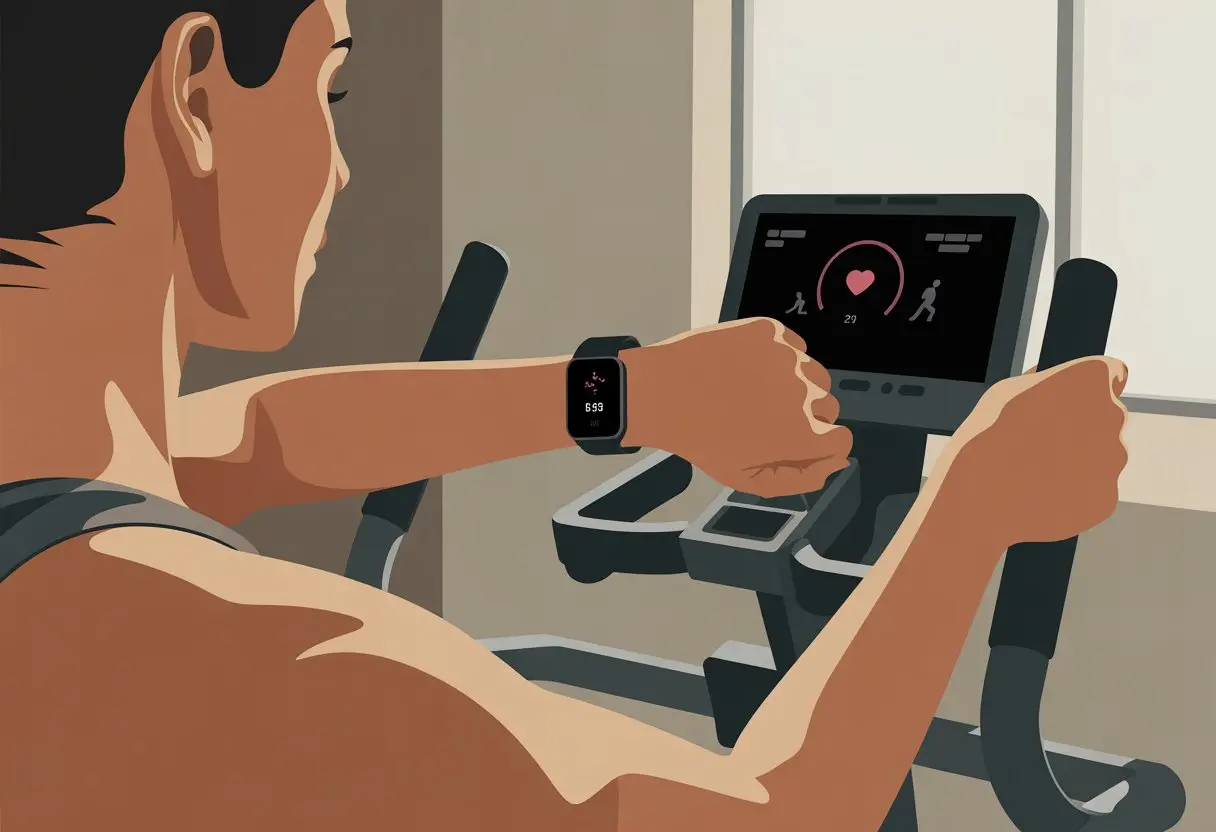
Let’s be real: using our smartwatches on the elliptical sometimes feels like trying to convince a cat to fetch. Our steps might not get counted, or the calories seem totally random. The best way to use a smartwatch on an elliptical? Make sure it’s snug on your wrist, pick the right workout mode, and grab those moving handles for better tracking.
We all want credit for every drop of sweat, but not every watch likes those stationary pedals. If hand movements aren’t tracked, strapping our smartwatch to an ankle or syncing with a cadence sensor can help with accuracy.
If our watch keeps ignoring our hard work, we’re definitely not alone. Let’s dig into some tips, hacks, and tricks to get our smartwatches working smarter while we step and sweat on the elliptical.
Getting Started With Your Smartwatch and Elliptical
Before we dive into a sweat session, we should double-check that our gadgets are ready to play nice together. A smooth setup means our smartwatch can count our steps (and not just our sighs of exhaustion) and link with the elliptical for better tracking.
Compatible Devices and Apps
Not all smartwatches are equal—some connect better with ellipticals than others. For example, an Apple Watch usually works well and can sync with gym equipment if we enable that in settings.
Devices like Garmin and Samsung Galaxy Watch also support indoor cardio, but sometimes need extra setup for elliptical workouts.
Here’s a quick look at some common pairings and apps:
Device
Companion App
Works with Elliptical?
Notes
Apple Watch
Apple Fitness
Yes
Needs Detect Gym Equipment turned on
Garmin
Garmin Connect
Yes
May need cadence sensor for best accuracy
Samsung Galaxy
Samsung Health
Sometimes
Step count might not always be accurate
VeryFit watches
VeryFit App
Partially
Can log elliptical workouts manually
We should check if our smartwatch supports elliptical tracking natively or through a third-party app. And if you’re hoping your old calculator watch counts, well, nope.
Setting Up for Indoor Cardio
First, let’s make sure our smartwatch is ready for gym mode. Most watches have a list of activities—let’s scroll for “Elliptical” or something close (sometimes it’s under “Other” or “Indoor Cardio”).
If it’s missing, some devices let us add custom workouts. Next, we’ll head to the settings on our watch or app.
For Apple Watch, we turn on “Detect Gym Equipment” under Workout settings. Garmin owners might look for activity profiles or set up a custom cardio workout.
If we use the VeryFit app, we can select elliptical from the list or log it later if we forget. Before that first stride, let’s check if our watch’s sensors—like heart rate and accelerometer—are enabled.
These help the device measure calories, time, and heart rate correctly, even if it gets confused by our not-so-graceful elliptical skills.
Connecting to Your Elliptical Machine
Connecting to an elliptical boosts tracking accuracy, but it depends on both our watch and the machine. Many commercial ellipticals have Bluetooth or ANT+ built in, so we can pair them with our smartwatch.
Apple Watch users can hold the watch near the contactless icon on compatible machines and wait for the “Connected” buzz. Garmin fans may need a cadence sensor installed on the elliptical to match stride data.
We can check the gym equipment settings or just ask a staff member (try not to look too lost). When everything’s set, our watch should show real-time stats—like calories burned, distance, and heart rate—matching what’s on the elliptical’s screen.
If it doesn’t, we might need to calibrate the machine or, well, wander into tech support territory. If the machine isn’t smart, we can log activity manually or try wearing the watch on our ankle for better results, especially if the handlebars don’t move.
When we hop on the elliptical with our smartwatches, it’s easy to forget we have tiny fitness robots strapped on. The right settings make a huge difference.
Tracking the right things—like heart rate and time—gives us actual data to brag about later.
Selecting the Right Activity Mode
Let’s admit it: our smartwatches don’t always recognize the elliptical as legit gym equipment. If our watch doesn’t have an elliptical mode, we can use “indoor cycling” or just pick another similar cardio mode.
Almost every major smartwatch—including Garmin and Fitbit—offers an indoor cycling or “other” mode for these moments. We should check our watch settings before starting.
We want real stats, not just random numbers. Some Garmins with Connect IQ let us add custom elliptical apps.
Certain models let us tweak stride length or use a cadence sensor for step accuracy, so every fake step counts. More tips? Try tracking elliptical workouts with a Garmin watch.
We need to reset the timer or stopwatch before we start. This way, our intervals, warm-ups, and “accidentally scrolling TikTok” breaks actually get recorded, instead of disappearing into thin air.
Monitoring Heart Rate and Metrics
Once we’ve started, it’s time to obsess over numbers. Our heart rate monitor acts as our personal hype coach, cheering us on (or warning us when we crank up the resistance too high).
A steady heart rate reading helps us see if we’re really working or just pretending while texting. Most smartwatches now display heart rate, calories, and duration—sometimes in colorful graphs that look way more dramatic than we feel.
If we keep our hands on the bars, step counts might not increase like regular walking, but heart rate and calories still get tracked pretty accurately.
We can use timers for interval training too. Set a timer for sprints or short breaks, turning the workout into a game against ourselves.
Checking stats during and after helps us adjust workouts, show off to friends, or just celebrate making it through another cardio session.
Maximizing Smartwatch Features During Elliptical Sessions
Our smartwatches do way more than just count steps. When we get on the elliptical, there are plenty of ways to make our gadgets more useful, keep us motivated, and maybe even make sweating feel less miserable.
Let’s focus on some clever features that can make workouts smarter.
Using Workout Alerts and Reminders
We’ve all zoned out mid-workout and realized we’re moving at snail speed. With smart alerts like timers, alarms, and workout reminders, we stay on track and don’t just watch someone else’s progress.
Setting an alarm to buzz every 10 minutes reminds us to keep up the pace or change resistance before we start thinking about dinner. Need extra motivation? Add a message reminder like “Don’t quit now!” or “You’re halfway to pizza Friday!”—it actually helps.
These reminders can tell us when to cool down, stretch, or even grab a quick water break. And if a friend calls during a session, we can decide if it’s worth stopping—spoiler: unless they’re offering snacks, probably not.
Customizing Watch Faces for Cardio
If our smartwatch could talk, it’d probably complain about boring watch faces. Good news—we can spice things up!
Set up a watch face with big, bold stats: heart rate, calories, speed, elapsed time, or even a goofy icon. Some of us like graphs, others just want giant numbers we can see through sweat.
With the data we care about front and center, we can check progress at a glance and get back to work. If we’re extra organized, we can even make a special “Elliptical Mode” face, so we’re never hunting for the right screen.
Music, Notifications, and Motivation
Let’s be honest: cardio without music feels like forever. We can control our favorite playlists right from our wrist, blasting pump-up songs without fumbling for our phones.
That saves time (and maybe our dignity) during those air-drum solos. Staying connected is easy too.
With notifications, we can see texts, incoming calls, and calendar reminders—without missing a beat or a step. We can even set a timer for interval sprints so we know when to speed up or slow down.
With music, reminders, and those sometimes cheesy motivational messages, our smartwatch turns into our own personal coach, DJ, and cheerleader—no personal trainer required.
Optimizing Cardio and Cross-Training With Your Smartwatch
When we use a smartwatch with an elliptical, we get all the tools we need to get creative. We can track data, mix up routines, and keep things interesting (at least until the machine starts squeaking).
Incorporating Interval Training
Interval training isn’t just gym lingo—it’s how we trick ourselves into working harder without noticing. On the elliptical, we can do HIIT (High-Intensity Interval Training) by switching between fast bursts and slower recovery.
Many smartwatches let us set custom intervals or use built-in profiles that beep at us like tiny, bossy coaches. For example, try 30 seconds at max speed, then 90 seconds slow.
Repeat for a few rounds. Some watches, like Garmin or VeryFit, even show heart zones to keep us honest.
We can watch our heart rate bounce around. Tracking intervals on the smartwatch helps us compete with ourselves (or that person who keeps bragging online).
The goal? Finish strong—and try not to “pause” too much.
Blending Elliptical With Other Activities
Sticking to just one machine? That gets dull faster than a worn-out treadmill belt.
With a smartwatch, we can mix up bursts on the elliptical with things like rowing, cycling, treadmill runs, or even a bit of strength training. Some watches offer a multi-sport or cross-training mode, so switching between activities almost feels effortless.
Feel like changing it up? Hop off and try a round of bodyweight squats, or squeeze in a short cycling session before heading back to the elliptical.
On those ambitious days, toss in some Pilates or yoga stretches. The smartwatch logs everything into one tidy workout summary, so we get credit for every drop of sweat—not just the elliptical part.
Switching Between Modes
Our smartwatch is smarter than it looks (even if it loves sending those “move!” notifications at the worst times).
When we switch from the elliptical to another activity, we just change the watch from “Elliptical” to “Outdoor Run” or “Bike” mode.
Most devices let us scroll through activities and pick the right one. Not only does this give us better data, but it also helps us spot trends for each exercise over time.
We can compare our progress in rowing versus cycling, or notice which days we’re feeling gutsy—spoiler: Mondays don’t usually make the cut.
Switching modes takes just a pause, a quick tap to select the new activity, and off we go again. Our calorie (and pride) totals will thank us, especially if we’re chasing a personal best.
If our watch allows, we can even create custom workouts for odd combos (like elliptical-plus-treadmill, because why not keep it interesting?).
If you’re unsure how to choose specific activities like the elliptical, some watches—like the Samsung Galaxy Watch—let us scroll to the elliptical workout right from the workout menu.
Analyzing and Improving Your Performance
To get the most out of our elliptical sessions, we need to do more than just show up and sweat.
We want to know what’s working, spot what isn’t, and maybe laugh at how little we actually move on those so-called “rest” days.
Reviewing Workout Data
Let’s scroll through all that info our smartwatch gathers. Most watches track heart rate, calories, distance, pace, and the length of our (sometimes clumsy) paddling on the elliptical.
Apps like VeryFit show colorful graphs that reveal just how hard we’ve worked—or how much we’ve slacked.
We should look for patterns. Did we burn more calories last week, or just binge more TV? Are our heart rates dropping for the same effort, meaning we’re getting fitter?
Is our activity steady, or are most “workouts” just trips to the fridge?
Don’t ignore our sleep and stress stats. Good sleep boosts recovery and performance, while high stress tends to slow us down.
If our scores drop, maybe it’s time for an early night or a few deep breaths.
Adjusting Your Goals for Better Results
After checking out what our app says (and trying not to take it too personally), we can tweak our fitness goals.
Maybe we need to add five minutes to our routine, or just try waking up before noon. Either way, it’s about small, honest steps.
We can use our smartwatch or the VeryFit app to set new targets—longer sessions, higher resistance, or better sleep. Focusing on one area at a time keeps things manageable, so we don’t end up dodging the elliptical altogether.
List of goal ideas:
Increase workout duration by 10%
Add one extra session per week
Try a higher resistance level
Get 7+ hours of sleep
Track stress levels and try meditation
Tiny changes add up. With a little humor (and maybe a nap), we’ll start seeing results—and maybe even look forward to working out.
Common Issues and Troubleshooting
We all want our smartwatches and ellipticals to just get along, but sometimes tech decides to mess with us.
Knowing how to deal with weird connections and suspiciously low step counts can save us a serious headache.
Connectivity Problems
Nothing ruins the workout mood faster than a stubborn smartwatch that won’t sync with the elliptical.
Sometimes, the device ignores the VeryFit app, or if we’re using an Apple Watch, it claims it’s tracking but gives us… nothing. Usually, Bluetooth is either off or just plain moody.
Quick Fixes:
Make sure Bluetooth is switched on for both devices.
Keep our phone and smartwatch close to the elliptical. Bluetooth hates long distances.
Restart both gadgets—yep, the old “turn it off and on again” trick still works.
Check that the VeryFit app or Apple Health app has permission to run in the background.
If there’s an update for the app or watch, cross your fingers and hope the glitches are fixed.
Using different brands can mean apps don’t always talk to each other. Syncing Apple Watch workouts to other fitness apps isn’t always smooth, so we might need a third-party solution or just some extra patience.
At least those extra steps count somewhere, right?
Inaccurate Metrics or Tracking
We’ve all had those days: sweating buckets on the elliptical, and our watch says we barely moved.
Most smartwatches measure steps by sensing wrist movement. Ellipticals can fool them, since our hands might grip stationary bars instead of swinging.
According to some folks online, this means our step count can look suspiciously low, even after a tough session.
Common Issues:
Steps might not count unless our arms are moving.
Heart rate can freeze if sweat gets between the sensor and our skin.
Calories burned sometimes look… optimistic.
Tracking in apps like VeryFit or Apple Watch can miss certain exercise types.
Tips to Improve Tracking:
Move one arm if possible, or wear the watch on the arm that moves most.
Make sure the watch is snug—loose bands confuse sensors.
Choose the elliptical or indoor cycling mode if the device has it.
Log workouts manually if automatic tracking drops the ball.
For more details about these quirks, including why smartwatches sometimes skip counting steps on an elliptical, check out this step tracking accuracy discussion.
It helps set realistic expectations (and maybe makes us complain a little less about stubborn tech).
Taking Your Training Beyond the Elliptical
We don’t have to stick to the smooth, repetitive glide of the elliptical forever.
Our smartwatches open up new workouts, fresh health tools, and maybe even a splash in the pool if we’re feeling brave.
Trying New Activities With Your Smartwatch
Why limit ourselves to one workout? Our smartwatches track almost everything.
We can hit the trails for a run, walk the dog until he starts bargaining, or get lost (safely) on new hiking routes.
Many smartwatches even track swimming, so if we don’t mind wet hair, we can try pool or open water swimming. In winter, ski mode helps us count every (sometimes wobbly) run down the slopes.
If we’re feeling adventurous, some watches even offer cricket and stair stepper tracking—because every step and swing matters.
Here’s a handy list to remind us how our smartwatch can tag along for the fun:
Outdoor run & walking
Hiking for those mountain-goat moods
Pool swimming & open water swimming
Ski for cold-weather warriors
Cricket (yep, it’s there)
Stair stepper for indoor climbing sessions
Tracking different activities keeps our stats accurate and helps us avoid boredom from staring at the same gym wall every week.
Tapping Into Smartwatch Wellness Tools
It’s easy to forget that our smartwatches do more than count steps—they can help us relax and recover, too.
Most offer breathwork sessions to guide us through deep breathing, especially when the last stair stepper workout leaves us gasping.
These sessions help lower stress and boost focus, so we’re ready for the next challenge—or at least lunch.
Smartwatches also keep an eye on our heart rate during and after exercise. This helps us see how we’re recovering and make sure we’re not pushing too hard.
Tools for sleep tracking and daily movement nudges keep us honest, since the watch will call us out if we sit too long pretending to stretch.
We can set goals for new habits or get encouraging nudges—perfect for anyone who needs a little extra motivation (but maybe not another text from our gym buddy).
Staying Motivated and Safe
Trust us, an elliptical session can feel endless if we lose track of time or run out of energy.
With a smartwatch, we get tools to stay on track, dodge distractions, and keep things fun—no matter what the weather’s doing.
Setting Alarms and Reminders
Let’s be real—sometimes we need a nudge to get moving, or even to wrap things up before we melt into a puddle.
With a smartwatch, setting an alarm or a reminder is super easy. Alarms help us start and stop our workout at the right time.
We can schedule one to remind us to hop on the elliptical, or set a gentle buzz for when it’s time to cool down.
Reminders come in handy for everything from stretching to rehydrating. The stopwatch feature is perfect for timing intervals.
Need a break? Set a short timer so we don’t “rest” for a whole TV episode. Smartwatches help us stick to our goals—no drill sergeant needed.
Adapting Workouts for Weather and Energy
Weather really does its own thing, doesn’t it? One minute, the sun’s out; the next, you’re dodging puddles.
Smartwatches step in and show us the latest weather updates, so we know when to stay inside and jump on the elliptical. No more wild guesses about whether we’ll come back from a run drenched or dry.
Energy levels? They’re just as unpredictable. Fitness apps let us check our heart rate and see how many calories we’ve burned.
When the smartwatch practically yells, “Hey, slow down!”—we usually listen. Adjusting speed or effort means we actually get more out of each workout, and maybe avoid burning out.
And if things still go sideways, well, we’ll just blame the watch and grab a snack.
Hi, my name is Garrett Jones, and I am a tech enthusiast. I enjoy researching the new tech that has been released, and have a vast knowledge of the best tech to purchase.
From a young age, I have always had a big interest in technology, and this blog is an extension of that interest. Through this blog, I hope to provide others with all of the information they need regarding tech options to consider, and things such as compatibility. Some of the different items I will be discussing include headphones, smartwatches, and how to fix common issues.