We’ve all been there. You wake up after what felt like a solid night’s sleep, ready to brag about those eight hours, and then your fitness tracker claims you barely slept at all.
So, what’s going on? Usually, our fitness trackers miss sleep data because we wear them too loosely, set them up wrong, or just move around a lot while we sleep.
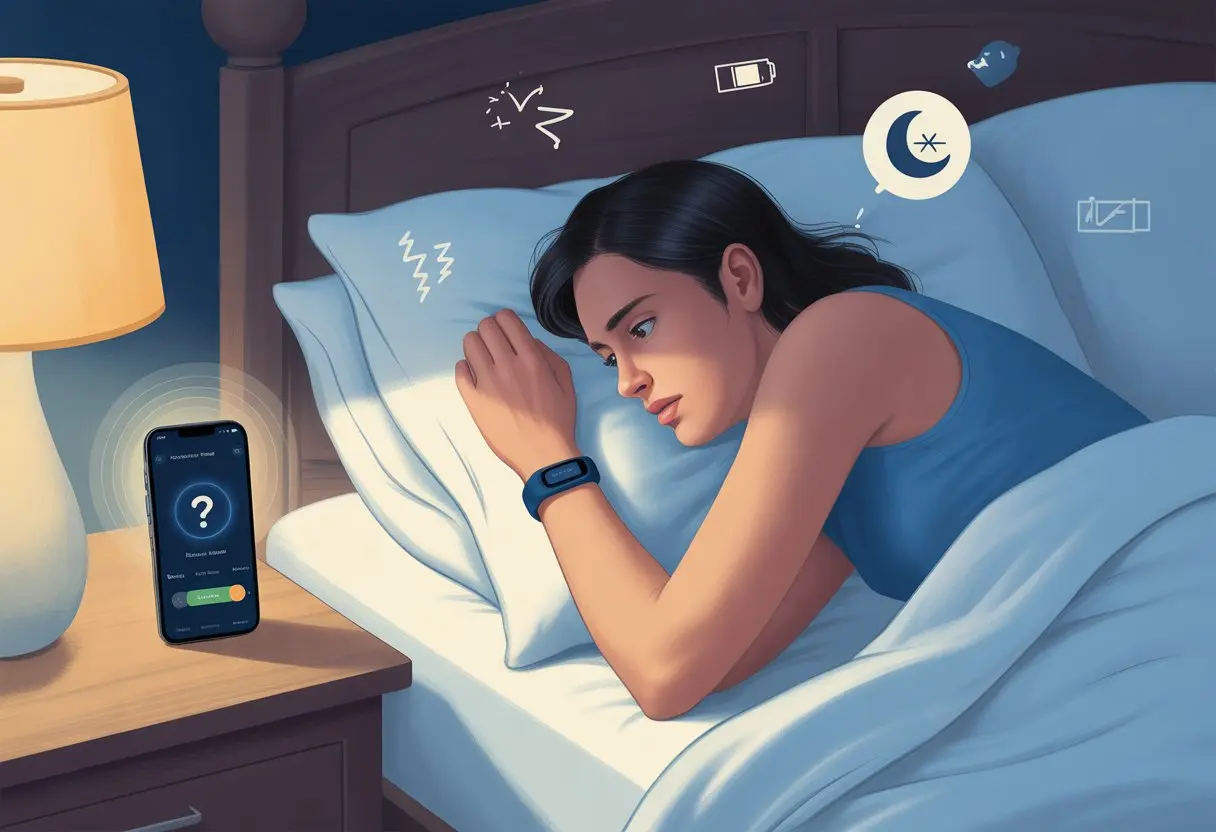
Sometimes, we forget the small stuff, like turning on “Sleep Mode” or syncing the device with the app.
Other times, our sleep habits just confuse even the fanciest gadgets. Wearing the tracker on the wrong wrist, hiding it under blankets, or letting the settings get out of whack can all throw things off.
Let’s dig into what’s happening when our trackers decide to snooze on the job, why they skip our sleep, and what we can actually do about it.
If you’re tired of your tracker accusing you of pulling another all-nighter, you’re not alone.
How Fitness Trackers Monitor Sleep
Fitness trackers seem like little wrist wizards, but there’s real science behind their sleep skills.
They use a mix of sensors and clever programming to figure out when we’re asleep and when we’re just restless.
Sensors and Technology Used
Let’s talk about what’s inside these trackers. They pack a bunch of sensors, each with its own job.
Most sleep trackers use accelerometers, optical heart rate monitors, and sometimes skin temperature sensors. Sounds high-tech, but really, they just watch for movement and pulse changes.
The tracker collects data all night. When we don’t move much and our heart rate drops, it thinks we might be sleeping.
Some trackers throw in extra sensors, like SpO2 for blood oxygen. More sensors usually mean better guesses at our sleep patterns.
Here’s a quick list of common sensors:
- Accelerometer
- Heart rate sensor
- Temperature sensor
- SpO2 sensor
Not every tracker includes all of these. That’s why some models just do a better job at sleep tracking than others.
Role of Accelerometers
Accelerometers steal the show for tracking movement. These little guys act like silent alarm bells.
If we flop around in bed, the accelerometer notices. When we stay still for a while, the tracker assumes we’re asleep.
Most trackers look for about an hour of inactivity before deciding, “Yep, you’re asleep.” But if we move a lot—even in our sleep—the tracker sometimes gets it wrong and thinks we’re awake.
This can make our sleep data look weird or incomplete, especially if we’re light sleepers or have wild dreams.
Some trackers try to be smarter by combining movement data with heart rate info. That helps them make fewer mistakes and track our Z’s more accurately.
You can find more about how trackers use movement to guess sleep on Reddit or the Fitbit Community.
Importance of Heart Rate Monitoring
Heart rate isn’t just for workouts. When we drift off, our heart rate usually dips and gets more steady.
Many trackers use this clue, along with movement, to get better at guessing when we’re really asleep.
Some devices can even spot light, deep, and REM sleep by watching heart rate changes over time. A big drop in heart rate can mean deep sleep.
If our tracker can’t pick up a solid heart rate—maybe because the band’s loose or we slept on our wrist—it might miss parts of our night.
That’s why a consistent heart rate reading is so important. For better sleep tracking, we should wear the tracker snugly, but not too tight.
If you want more details, check out community discussions about why heart rate matters for sleep tracking.
Common Reasons Your Fitness Tracker Isn’t Tracking Sleep
Sometimes, our wrist gadgets get confused and just skip tracking our sleep.
There are a handful of reasons this happens, and most are easy to miss if we’re not paying attention.
Wearing the Device Incorrectly
Plenty of us have woken up to find our tracker halfway up our arm or dangling loose.
Wearing the tracker too loose or too tight messes with the sensors. For best results, it should sit snug—right on the skin, but not so tight we lose circulation (or style).
If the device is upside down or sliding around, it sends mixed signals. Some trackers want us to wear them on our non-dominant wrist, so they can tell real sleep from us smacking the alarm clock.
If the tracker isn’t in the right spot, sleep stages might not track right—or at all.
Checking the manual for how to wear it can save us from waking up to a blank sleep report.
Low Battery or Power Issues
A tracker with no battery is just a bracelet with delusions of grandeur.
If we let the battery get too low, most devices stop sleep tracking to save power. Some skip tracking altogether when in low-power mode.
Charging up before bed is a simple step, but easy to forget. Letting the battery run empty means we get a silent night—until we check the app and see nothing.
Sometimes, the charging cable fakes us out and doesn’t actually charge the device.
Double-check the charger and charge level after plugging in. That way, our tracker’s ready to record every minute of tossing and turning.
Apple Watch owners especially should know: a dead battery means no sleep data at all, as discussed in the Apple Support Community.
Device Not Syncing Properly
Syncing issues are like two friends giving each other the silent treatment.
If our tracker isn’t syncing with our phone, sleep data gets stuck. The app is supposed to grab the info and show us the results.
If syncing fails, the app might not show any sleep history.
Bluetooth problems, old software, or a tracker that needs a reboot can all cause syncing headaches.
Sometimes, just toggling Bluetooth or restarting both devices gets things working again.
If syncing still won’t happen, some apps let us do a factory reset (which sounds scarier than it is—it’s just a digital reset). Fitbit devices, for example, might miss sleep data unless they’re properly synced and updated, according to the Fitbit Community.
Inconsistent Wearing Habits
Trackers can only track sleep if we actually wear them overnight.
If we skip a few nights or only remember the tracker after midnight snacks, the data will be patchy or missing.
Trying to sneak the tracker on just before dozing off? It might not kick in if it doesn’t sense us winding down.
Some devices look for a regular bedtime before deciding we’re asleep, not just lying still, regretting dessert.
Most common mistake? Taking the tracker off to charge, then forgetting it until morning.
Wearing our fitness tracker all night, every night, is the best way to get full sleep stats—including the “awake time” spent debating whether to check our phones.
Troubleshooting Sleep Tracking Problems
Before we go demanding a new fitness tracker, let’s actually check what’s wrong.
Sometimes, sleep stats vanish for silly reasons like settings, technical gremlins, or that one update we ignored.
Checking Device Settings
Let’s be honest, we all rush through setup and skip instructions. But settings can make or break sleep tracking.
If our tracker isn’t counting sleep, the fix might be right in front of us. First, we should confirm sleep tracking is actually turned on.
Obvious, but sometimes the simplest things trip us up.
Wearing the device correctly is key, too. Most trackers, like Fitbit, want a snug fit on the wrist—too loose or too far up the arm can cause trouble.
Tracking also gets confused if we wear it upside down or on the wrong wrist. Double-check which wrist we picked during setup.
Let’s look at battery savers or power modes. Some watches, like Garmin, will stop recording sleep if battery saver mode is on—so we save battery but lose all our precious sleep data.
Check for modes that could turn off sleep or activity tracking at night. For more on this, see this Garmin community discussion.
Updating Firmware and Apps
When our tracker gets stubborn, sometimes it just wants a software update.
Outdated firmware or apps can cause missing sleep stats. Manufacturers fix bugs (including sleep tracking bugs) with updates.
It’s easy to check for updates. Just open the companion app and look for “Firmware Update” or “Check for App Update.”
Updating both the tracker and its app keeps them on speaking terms.
If we keep skipping updates, we might miss out on sleep stages or wake up to a tracker with amnesia.
Let’s try not to hit “remind me later” every single time an update pops up.
Restarting Your Fitness Tracker
Ah, the old “have you tried turning it off and on again?” It’s a classic for a reason.
Restarting our tracker clears out little glitches that keep sleep stats from showing up.
Most trackers just need a long press of a button or two. Others might make us dig through menus in the app.
The restart process is usually quick—a minute or two, tops.
This helps because memory gets cleared and most software hiccups disappear.
So before we panic about lost sleep tracking, a simple restart might save the day. If only fixing our sleep habits was as easy!
Understanding Sleep Data Accuracy
If our fitness tracker spits out weird sleep numbers, it’s easy to think it’s just guessing.
But there’s a method to the madness. Sleep data can get thrown off by the way we move in bed, or even by what’s happening around us—like sneaking out for a late-night snack.
How Sleep Movement Affects Readings
Our trackers rely on movement and heart rate to figure out if we’re actually sleeping, rolling over, or maybe just having a midnight dance-off.
If you toss and turn a lot, your device might think you’re wide awake. Sometimes, you’re deep in dreamland, but that extra wiggle tricks the tracker into thinking you’re up binge-watching TV.
Some fitness trackers get confused if you’re just sitting in bed reading or scrolling on your phone. The device sees you staying still and just assumes you’re asleep—no magic, just a simple guess.
This confusion can mess up your total sleep hours or even add fake awake time. For a laugh, check out how a Garmin device sometimes thinks sitting equals sleeping.
External Factors Influencing Results
Lots of things outside our bodies can throw off trackers.
Wearing your fitness tracker too tight or too loose? That’s a recipe for messy heart rate readings. Block the back sensor with a thick pajama sleeve or let skin oils build up, and you’ll get inaccurate readings. Clean skin really does mean better data.
Even the way you wear the tracker matters. Move it higher up your arm for comfort, and you might mess up your sleep results.
Charge the watch while napping, and it might start logging “sleep” while it’s just hanging out on the dresser. Some devices, like the Apple Watch SE, have been caught doing exactly that.
Device-Specific Sleep Tracking Issues
When your fitness tracker skips tracking your sleep, it’s not just being lazy.
Apple Watch, Garmin Connect, Google Fit—they all have their own quirks. The main trouble spots? Battery levels, sensor placement, software hiccups, and connectivity.
Apple Watch Troubles
Apple Watches can be a little dramatic—they sometimes refuse to admit you slept at all.
A dead or dying battery usually causes the most trouble. If the charge drops out overnight, the watch just gives up and logs nothing.
Wear it too loose or let it slide around your wrist, and you’ll block the heart rate sensor. No heart rate, no sleep record.
Some models want you to keep both the watch and your iPhone updated. If you skip an update, data syncing can get weird fast.
Turn on Theater Mode or Do Not Disturb by accident, and the watch might think you’re watching a movie, not sleeping. It’s worth checking your wrist settings before bed—Apple seems to prefer it that way.
If nothing else works, try restarting the watch. Or maybe, just restart yourself.
Garmin Connect Glitches
Garmin devices usually love to track, but sometimes they need a break.
Sleep tracking fails most often when the heart rate sensor struggles—maybe you wore the watch too loose or put it over the bony part of your wrist. Garmin likes a snug fit.
If you sleep less than an hour, Garmin won’t record a thing. It only logs nights with more than a certain amount of sleep.
Syncing issues between your device and the Garmin Connect app can make data disappear or show up late. Outdated software—either on the watch or your phone—makes things worse. A quick sync and software update often helps.
Google Fit Quirks
Google Fit tries to be your easy-going buddy, but it’s not perfect.
If your wearable isn’t compatible or can’t share detailed sleep data, you’ll see gaps or just “N/A” for sleep stages. Sometimes the app “forgets” to pull in data from partner devices—it’s not personal, but it sure doesn’t help.
Low battery or not wearing the tracker long enough can leave Google Fit confused. Inconsistent Bluetooth connections don’t help; if your phone and wearable lose touch, your sleep results might just vanish.
To avoid these issues, double-check your settings, keep everything charged, and only trust Google Fit on devices that play nicely with it. Sure, we’d all like to blame the tech, but sometimes it’s just user error (not that we’ll admit it).
Sleep Stages, Sleep Patterns, and Their Detection
Honestly, our sleep patterns are a mystery—even to our gadgets.
Fitness trackers work hard to figure out when we’re in deep sleep, REM, or sneaking in a quick nap. Sometimes, though, they just can’t keep up with our weird sleeping habits.
Limitations in Tracking Deep Sleep and REM Sleep
Our fitness trackers have lots of sensors, but they’re not exactly magic.
They usually estimate sleep stages using heart rate and movement. If you toss, turn, or wear the band loosely, the data gets muddled. That’s why your sleep data might miss deep sleep or REM stages.
Some trackers just guess at sleep stages, and those guesses can be way off. You might see 0% to 8% deep sleep, even if you feel great. REM numbers can be all over the place.
Wrist sensors can’t read your brain (thank goodness), so results can be hit or miss.
Software updates sometimes change how tracking works, so one week you’re sleeping like a champ, and the next week you’re apparently up all night. Dramatic, right?
Why Naps May Not Register
Fitness trackers like routines, especially overnight sleep.
You might sneak in a 30-minute power nap, but your tracker just shrugs. Many devices only detect longer sleep, and mostly if it happens at night.
If you nap during the day, the tracker might only see you sitting still. These gadgets don’t always count sleep outside your usual bedtime, so naps often get ignored.
Some watches, like Apple Watch, want you to enable certain features—turn on Sleep Focus, or your naps won’t count.
When your catnap doesn’t show up, just know the tracker is missing out on your best sleep skills. Shouldn’t these devices appreciate all the hard pillow work?
When to Seek Medical Advice
Sometimes, our fitness trackers aren’t the real problem.
Even the smartest gadgets can’t fix everything. If sleep is a struggle, you might need help from a real doctor (who, sadly, doesn’t sync with Bluetooth).
Signs of Sleep Disorders
If you spend your nights wrestling with your pillow, it might be more than just a confused tracker.
Watch for chronic trouble falling asleep, waking up all night, or feeling exhausted no matter how long you sleep.
Some other red flags:
| Symptom | Description |
|---|---|
| Loud snoring | Waking up the whole street? Not great. |
| Pauses in breathing | Gasping or choking in the night. |
| Extreme daytime sleepiness | Falling asleep during meetings (awkward when the boss notices). |
If you spot any of these, you might have a real sleep disorder, not just a glitchy tracker. Getting a medical evaluation is a smart move.
Sleep Apnea and Device Detection
Let’s be honest—your fitness tracker isn’t a sleep detective.
It’s great for counting steps, but it can’t diagnose sleep apnea, no matter how fancy the watch face looks.
Sleep apnea means you stop breathing for short periods during sleep. It’s sneaky and gadgets usually miss it, since those pauses are easy to overlook.
You might see weird sleep data or no record at all, even if you didn’t stay up all night.
If your tracker keeps showing restless sleep, low scores, or isn’t logging sleep at all, it’s worth asking your doctor about sleep apnea. Real doctors use tests and equipment way smarter than your wrist bling.
Advanced Sleep Tracking Features and Metrics
Fitness trackers have leveled up—they do more than just tell us if we’re awake or asleep.
With things like pulse oximetry, sleep stats, and app integration, we can actually learn something about our sleep.
Pulse Ox and Blood Oxygen Monitoring
Pulse ox (pulse oximetry) sounds high-tech, but it’s just your tracker measuring how much oxygen is in your blood while you sleep.
Why care? Low blood oxygen at night can point to sleep apnea or other issues that ruin your morning mood.
Many trackers use a tiny light on the back to check this. If yours offers pulse ox, you might need to turn it on manually or set it to track only while you’re sleeping.
These readings aren’t as perfect as what you’d get at the doctor’s office, but they give you a clue about your nightly oxygen rollercoaster. Numbers below 90%? Maybe chat with a professional.
If your device isn’t tracking sleep at all, check if Battery Saver mode is on—it can mess with advanced sensors and sleep statistics.
Connecting to Apple Health and Google Fit
Who doesn’t love a good app? A lot of fitness trackers let you hook up your sleep data with big platforms like Apple Health or Google Fit. That way, you don’t have to bounce between five different apps just to figure out if you slept more than your cat.
To get your tracker talking to Apple Health or Google Fit, you’ll usually need to give it permission. You do this through your phone settings or sometimes right in the tracker’s app.
Once you make the connection, your sleep stats—like total hours asleep, deep versus light sleep, maybe even pulse ox—show up on your main health dashboard.
If syncing doesn’t work, check if your apps are updated and that you’re logged into the same account everywhere. Some trackers need a little push (or a reboot) before they finally share info across platforms.

From a young age, I have always had a big interest in technology, and this blog is an extension of that interest. Through this blog, I hope to provide others with all of the information they need regarding tech options to consider, and things such as compatibility. Some of the different items I will be discussing include headphones, smartwatches, and how to fix common issues.
- How to Get Text Messages on Fitbit Versa 2 Android: Simple Guide for Users - October 13, 2026
- Why Doesn’t My Fitbit Record My Sleep? Quick Troubleshooting Guide - October 13, 2026
- How to Change Face on Fitbit Versa 2: Quick and Easy Guide - October 12, 2026
Related Posts: