Let’s be real—most of us don’t exactly sit like royalty at our desks. Our backs hunch, necks crane, and suddenly we’re one stretch away from looking like a human question mark.
When you use a fitness tracker (or a posture trainer), you can get gentle nudges to straighten up during the day. These reminders help us avoid that dreaded slouch.
No more balancing books on our heads like we’re prepping for a Victorian tea party. Now, smart tech does the nagging—sometimes with a buzz that basically says, “Hey, straighten up!”
We get to train our posture while scrolling memes or answering emails. Maybe, just maybe, we’ll save our backs in the process.
Let’s dig into how we can use these handy trackers to keep our spines happy—without hiring a personal trainer or tossing out our favorite chair. If we’re aiming to stand tall, why not let modern gadgets help (and maybe add a little humor along the way)?
Understanding the Relationship Between Fitness Trackers and Posture
Let’s be honest—perfect posture isn’t most people’s strong suit. We slouch, we lean, and sometimes our shoulders just do their own thing.
Fitness trackers jump in as tiny digital coaches, helping us notice when our spine or shoulders start to get out of line.
With sensors and smart tech, wearables track our movements and check how we sit, stand, or move. That means we can spot bad habits and try to fix them.
How Wearable Technology Monitors Your Movements
Fitness trackers use built-in sensors to notice how straight (or not) our spines are. It’s not magic—it’s just clever tech.
When you wear a device on your back or shoulders, it measures angles and movement. It tells us if we’re hunching over or standing tall.
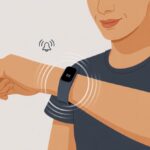
Some of these wearables connect to apps and send nudges or alerts when our posture hits “potato mode.” Others buzz or beep until we straighten up.
Honestly, it can feel like a friendly robot yelling at us to sit up straight—but it works. Physical therapists use these devices to help people with spinal alignment, and some can even monitor us remotely. So, hiding our slouching behind a screen? Not so easy anymore.
Sensors and Metrics Used for Posture Detection
Inside fitness trackers, you’ll find tiny gadgets with names like accelerometers, gyroscopes, and sometimes even little computers using computer vision. Accelerometers sense if we’re leaning forward, backward, or doing some awkward desk-chair limbo.
Gyroscopes catch any twisting, so they know if we’ve tied ourselves into a pretzel. Some trackers gather data every second, building a history of our posture—because who doesn’t want a timeline of their daily slouches?
Metrics usually include spine angle, shoulder tilt, and how long we keep “good posture.” The app pulls all this together, so we’re not left guessing if we’re sitting like royalty or a shrimp. We get instant feedback—sometimes whether we want it or not.
Setting Up Your Fitness Tracker for Posture Correction
Picking the right tracker, dialing in the settings, and calibrating sensors actually matters for our backs. A few setup steps can help us use tech to improve posture instead of just collecting dust.
Choosing the Right Device Features
Not every tracker is ready to watch our spines like a hawk. We want something that tracks more than just steps—a tracker with posture monitoring, motion sensing (accelerometers and gyroscopes), and vibration alerts is key for fighting slouch mode.
Extra features like exercise reminders, app support, and comfy straps matter, too. Devices like the Upright GO focus on posture, while some smartwatches (hello, Apple Watch) can do the job with a little app magic.
Here’s a quick table of features to think about:
Feature
Why It Matters
Posture Sensors
Tracks our alignment
Vibration Alerts
Nudges when we slouch
App Integration
Tracks progress, gives tips
Comfortable Fit
So we’ll actually wear it
Long Battery Life
Less charging, more tracking
When in doubt, try it on. Nobody wants a tracker poking them all day.
Configuring Posture-Tracking Settings
Now comes the fun part: telling our tracker what to do. Usually, we start by downloading the companion app, then head to the posture settings.
Here, we set up reminders and choose how sensitive we want alerts to be. Customization is our friend. We can pick if we want a buzz every time we slouch or just a gentle nudge now and then.
Many trackers let us schedule alerts, so we only get nagged during work hours and can chill in the evenings. Setting realistic intervals helps avoid “alarm fatigue.” We want encouragement, not a constant wrist tantrum.
If our tracker mistakes dancing for slouching, it’s time to calibrate. Most posture trackers ask us to stand or sit up straight and hold still while they record our “ideal” posture.
That way, the device knows when our back is on point—or when we look like an overcooked noodle. Calibration takes a minute or two, and we might need to repeat if our setup changes (like switching to a beanbag chair).
It’s smart to recalibrate after big changes, like joining a new workout or moving our desk. Getting this right means our tracker gives us real feedback, not random complaints.
If all else fails, check the app’s help section or reach out for support—our backs deserve it.
Using a Fitness Tracker to Identify Poor Posture Habits
We like to think we sit like statues, but let’s be honest—most of us resemble overcooked noodles. Fitness trackers act like tiny, wearable coaches, pointing out our not-so-great posture habits even when we try to ignore them.
Detecting Slouching and Rounded Shoulders
Slouching and hunching sneak up on us, especially after hours at a desk or scrolling on our phones. Fitness trackers with posture sensors can sense when our shoulders round or we start to droop.
These devices use accelerometers and gyroscopes to catch our spine waving goodbye to good form. When we slouch, some trackers send a gentle buzz or vibration, just as we’re about to become chair-shaped pancakes.
Some newer posture devices even use computer vision if paired with a camera app. A quick look at the tracker app shows trends—how often did our shoulders imitate turtle shells today? Seeing this data makes it tough to deny our desk potato status.
Recognizing Prolonged Inactivity
Sitting still is strangely easy and somehow the root of most back problems. Our fitness trackers notice when we haven’t moved in a while.
Most have an inactivity timer that nudges us if we’ve been glued to the seat too long. Some trackers show inactivity in a daily graph or give us a nudge every 30–60 minutes.
Ignore these reminders long enough, and we’ll notice more than a stiff neck—think headaches and shoulder tension from poor posture.
Some apps even break down our biggest chunks of inactivity. We get to see ourselves topping the “statue Olympics”—not exactly a trophy we want. These features make it harder to forget about breaks, even if we’re deep into a streaming binge or a marathon homework session.
Improving Posture with Real-Time Tracker Feedback
https://www.youtube.com/watch?v=p9BPm2hWrKU
When we use a fitness tracker for posture correction, we get instant feedback on how we’re sitting or standing. This helps us spot bad habits and work toward that dream of better posture—no more slouching like wilted houseplants.
Understanding Alerts and Nudges
Our fitness tracker doesn’t just sit there looking pretty. It sends us timely alerts and polite (sometimes not-so-polite) nudges when our posture slips.
Sometimes we get a buzz, a beep, or even a message that feels a little too honest: “Straighten up—your back will thank you!” These alerts can pop up for anything from working at a desk to doing squats at the gym.
Here’s a quick rundown:
Alert Type
What It Usually Means
Example Notification
Vibration
Bad posture detected
“Time to fix your shoulders!”
Sound
Immediate action needed
“Stop slouching, please!”
Visual on app
Posture stats and advice
“You’ve slouched 6 times.”
We can adjust the sensitivity and how often these nudges show up, so we’re not getting called out every time we blink. The best part? We don’t have to guess if we’re leaning, hunching, or pretending our spine is spaghetti.
Responding to Notifications
When our tracker sends a notification, it’s not out to ruin our day—it’s trying to save our backs. Responding right away is key.
If our tracker vibrates or flashes a warning, we should pause and reset our posture: shoulders back, chest out, and try to look as tall as possible (no need to stand on a chair).
During workouts, the feedback helps us fix our form mid-squat or plank—way better than hearing about it from a smug gym buddy. At our desks, we can use notifications as a reason to stretch, adjust our chair, or maybe even strike a superhero pose before diving back into emails.
Making these quick changes shows our tracker who’s boss. Our posture gets better, and we might even get fewer notifications over time. That feels like a win. For more on how AI and real-time feedback help during workouts, check out this real-time gym posture correction approach.
Exercises and Activities to Support Posture Correction
If we want to stand tall like confident flamingos instead of hunched-over trolls, daily habits and a few specific exercises make a huge difference. A fitness tracker helps us keep score, so we know when our spines are winning or slouching in defeat.
Incorporating Posture-Friendly Movements
Honestly, our bodies just want to take it easy. That’s why we end up slouching at our desks or melting into the couch. Still, a few simple moves each day can remind our muscles how to work right.
Wall angels always feel a bit silly, but they really do wake up our shoulders and upper back. You just lean against the wall, slide your arms up and down like you’re making snow angels, and suddenly, muscles you forgot about start firing.
Pelvic tilts and bridges give our hips and lower back a gentle nudge. Our knees will probably thank us after a week or two.
And hey, walking, swimming, or even yoga? Those aren’t just for fitness buffs. They’re solid ways to keep our core strong, keep our knees happy, and help our posture all day long.
If you want ideas, Healthline’s got a posture exercises list that makes stretching less intimidating.
Using Guided Exercise Programs
Let’s admit it—not everyone’s born knowing how to stretch or pose like a pro. That’s where guided programs really help.
Most fitness trackers pair with apps that walk us through routines step by step. They even beep—sometimes a little too aggressively—when we slack off.
We can pick routines for our back, core, or knees, depending on what needs the most help. If videos leave us scratching our heads, some trackers show quick animations so we know exactly where to put our arms and legs.
If you’re bored, try a virtual trainer or hop into a live online class. Watching someone else wobble through planks? Weirdly motivating.
Cleveland Clinic suggests simple moves like wall angels and pelvic tilts, and we can track our progress every day.
Tracking Progress Over Time
The best part about a fitness tracker? We can actually see our progress—no spreadsheets required. These gadgets count our steps, track calorie burn, send posture reminders, and even nudge us to stand up.
Hitting our standing goal might earn us a happy buzz or a digital high-five. Some trackers let us compare our stats week by week. We might even notice we stand taller after a while.
If the tracker dies or we forget to wear it, well, the charts might not look so impressive. But when we keep up, the data tells the truth.
We can also log aches and pains, especially in our knees or back, to spot patterns. Tracking makes it easier to stick to our plan and avoid turning into a human question mark.
Troubleshooting Common Fitness Tracker Posture Issues
Fitness trackers are handy, but sometimes they act more like a clueless cousin than a coach. It’s easy to get annoyed when the numbers look off or the battery dies right when we need it.
Getting our tracker to play nice is important if we want better posture.
When the Data Doesn’t Add Up
Some days, our tracker claims we’ve sat perfectly straight for hours, but our backs tell a different story. Most trackers use sensors—gyroscopes and accelerometers—but even fancy tech can mess up.
If our steps look suspiciously low or we never get posture reminders, maybe we’re wearing the tracker wrong. We need to make sure it’s snug and in the right spot—usually on the wrist or clipped to the torso for posture tracking.
Calibration helps too. Most apps make us do a setup move—it’s like a first handshake with the tracker. If things still seem off, we can reset the device or update the app.
And hey, turning it off and on again? Still the classic fix. It works more often than you’d think.
Battery Life and Wearing Position
Even the fanciest tracker is useless if the battery dies halfway through the day. Keeping it charged is a bit like remembering to water plants—we mean well, but sometimes forget until it’s drooping.
Movement and posture monitoring use up more power, so we can turn off extras like GPS or heart rate if we’re just tracking posture. Charging overnight or while we shower usually does the trick.
As for where to wear it, let’s not let style mess with function. If the instructions say chest strap, we shouldn’t try to make ankle fashion a thing.
Wearing it wrong means bad data. Unless we really want weird tan lines, posture matters more than looks.
For more help, check out our favorite posture exercises that work well with trackers.
Maximizing Posture Benefits Beyond the Tracker
Fitness trackers buzz and beep to keep us on track, but real posture improvement comes from building habits and using what we learn, even when no gadget is watching.
Mixing daily routines with mindful movements gives us a much better shot at fixing our posture for good.
Building Good Posture Habits Daily
Let’s be real, most of us don’t have a robot yelling “stand up straight!” all day. Trackers help, but we still need to train our brains and bodies to move right without reminders.
Setting phone alarms or sticking notes around with cues like “shoulders back!” can give our spines a fighting chance.
Microbreaks are a secret weapon. Standing up, stretching, or just wiggling for a few seconds helps our muscles reset.
Instead of treating posture like a five-minute task, we sneak it into daily stuff—brushing teeth, grabbing snacks, or checking ourselves out in the mirror.
Celebrating tiny wins matters too. Maybe bust out a ten-second chicken dance when you remember to straighten up.
The more we catch ourselves and reward the effort, the easier it is for good posture to become our new normal.
Transferring Skills to Non-Tracked Activities
When you finally nail good posture with a fitness tracker, it’s easy to just forget about it the minute you take the device off. But honestly, our backs don’t get to clock out, do they?
We have to carry those new habits into real life—at the office, walking to the store, even when we’re playing sports.
I like the trick where you picture an invisible string tugging your head up. It’s a little silly, but it works. Or hey, try using everyday stuff—a chair, your bag, or that one friend who always nags you—as reminders to straighten up.
Every time you sit down or grab something, there’s a little opportunity to check in with your posture.
Hi, my name is Garrett Jones, and I am a tech enthusiast. I enjoy researching the new tech that has been released, and have a vast knowledge of the best tech to purchase.
From a young age, I have always had a big interest in technology, and this blog is an extension of that interest. Through this blog, I hope to provide others with all of the information they need regarding tech options to consider, and things such as compatibility. Some of the different items I will be discussing include headphones, smartwatches, and how to fix common issues.