Let’s be real: nobody wants to mess with tangled headphone wires anymore. We’ve all done that awkward pocket dance, hoping no one’s watching while we try to untwist cords. That’s why Bluetooth headphones feel like they dropped in from the future, letting us enjoy music, podcasts, or calls without any of the hassle.
Bluetooth headphones use invisible radio waves to send sound straight from our devices to our ears—zero wires needed.
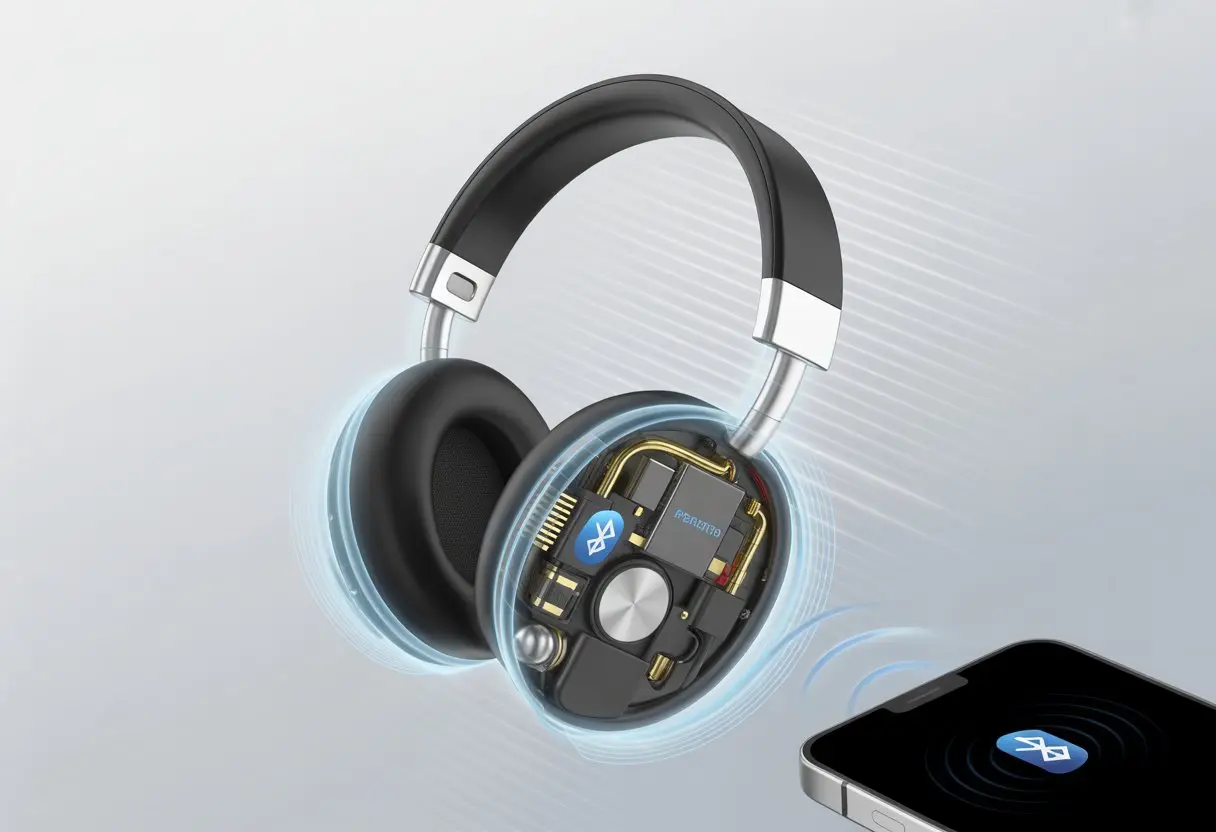
Honestly, it’s wild how these tiny gadgets connect so easily to our phones and laptops. It almost feels like magic, but there’s just some clever tech behind the curtain.
Ever wondered what’s really going on when we hit that “pair” button? Or why our music suddenly cuts out if we wander too far from our phone?
Let’s dig into how this wireless magic actually happens (and maybe laugh at our old, cord-tangled selves). Bluetooth headphones have a lot more going on inside than you’d think.
What Are Bluetooth Headphones?
Bluetooth headphones give us tangle-free listening. They use short-range radio signals—not actual magic, unfortunately—to send audio from our device to our ears.
Thanks to Bluetooth, we can skip the wires and still jam out, take calls, or binge podcasts.
Bluetooth Headphones vs. Wireless Headphones
Let’s clear up the confusion. Not every wireless headphone is a Bluetooth headphone, but every Bluetooth headphone is wireless.
Some wireless headphones use other methods, like radio frequency (RF) or infrared. Bluetooth headphones stick with Bluetooth, connecting to our phones, laptops, and other gadgets within about 30 feet.
RF wireless headphones can reach farther, but usually need a base station. Most of us pick Bluetooth headphones, earphones, or earbuds since they connect straight to our devices.
Wireless earbuds, like true wireless earbuds, don’t even have cables between the buds. If we want freedom and easy setup, Bluetooth’s the obvious choice.
Key Features of Modern Bluetooth Headphones
Today’s Bluetooth headphones come loaded with features that make wired models look ancient. Most models have rechargeable batteries, so we get hours—or even days—of use before plugging in.
Here’s a quick rundown of what we usually get:
- Hands-free controls: Pause, skip, or change volume with a tap or button.
- Noise cancellation: Block out the world (sorry, noisy commuters).
- Microphones: Take calls or chat with virtual assistants.
- Comfortable designs: From big over-ear headphones to tiny earbuds, there’s something for every ear.
Many Bluetooth earphones and headsets let us pair with more than one device, so switching from phone to tablet is easy. Since Bluetooth compresses audio, some top models use smart tech to keep sound quality high.
We get clear music whether we’re sweating at the gym or just pretending to work.
How Bluetooth Technology Transmits Sound
Bluetooth headphones take the music we love, turn it into a digital signal, send it through the air, and then turn it back into sound in our ears. Bluetooth tech does a bunch of heavy lifting while we just hit play.
The Journey of a Digital Signal
When we hit play on a playlist, our phone or computer converts the music into digital data. Basically, it’s all zeros and ones now.
Our device doesn’t let that digital signal just sit there. Bluetooth tech transforms the data into radio waves, which travel quickly through the air using a special frequency—usually between 2.4 GHz and 2.4835 GHz. It’s not magic, just some neat science, as How Bluetooth Works explains.
When these wireless signals reach our Bluetooth headphones, another process kicks in. Inside, a digital-to-analog converter (the DAC) translates the digital data back into smooth, real sounds.
That’s what actually hits our eardrums and gets us bobbing our heads.
From Your Playlist to Your Ears: Data Transmission Steps
Here’s what happens, step by step:
- We tap play. Our device turns the music into digital bits.
- Bluetooth devices pair up with a digital handshake.
- The device compresses the data to save space and energy.
- Compressed digital signals get sent as radio waves.
- Our headphones grab the radio waves and turn them back into a digital signal.
- The DAC in the headphones converts digital sound into the real thing.
All of this happens crazy fast, so it feels instant to us. That’s why we can listen to music wirelessly with solid sound and barely any delay.
If you want more details, check out this deep dive into Bluetooth audio transmission.
Honestly, it beats untangling wired headphones every time.
Demystifying Sound Quality in Bluetooth Headphones
When we listen to music on Bluetooth headphones, there’s a lot happening behind the scenes. Digital signals, tiny audio codes, and invisible waves all hustle to give us the smoothest sound they can.
What Affects Sound Quality?
Bluetooth doesn’t just send songs through the air. As soon as we hit play, our phone or laptop takes the original sound and gives it a digital makeover. The signal gets compressed so it can make the trip over Bluetooth without a hitch.
But compressing audio can be rough sometimes. Some details get lost just to make the file smaller. That’s why wired headphones usually win on pure sound—no compression needed.
Wireless tech keeps improving, though, and honestly, a lot of people can’t even tell the difference anymore.
Latency is another thing that messes with our listening. It’s basically a delay between when the sound is made and when we hear it. If it takes too long, the sound falls out of sync, which is super annoying for movies and games.
So, the main things that can mess with our audio? Compression, latency, and connection quality. Sometimes, it feels like they’re all out to ruin our jam.
LD and Other Audio Codecs
Audio codecs are the real MVPs here. They’re the rules for how audio turns into digital signals and back. Each codec tries to keep music sounding good while shrinking its size for Bluetooth’s journey.
LDAC and aptX are popular codecs that let us listen to higher-quality tunes over Bluetooth. LDAC, which is big with Android, can handle more data than basic codecs like SBC or AAC. More data usually means better sound, but only if both our headphones and device support it.
AAC is another big one, especially for Apple users. It’s supposed to keep music sounding clean, but sometimes glitches when the Bluetooth connection is weak.
Better codecs can mean lower latency or improved sound, but sometimes they use more battery. If you’re curious, there’s a lot more on Bluetooth codecs and their importance for audio quality.
So yeah, not all Bluetooth headphones sound the same. The codec they use can be the difference between amazing sound and just “meh.”
Latency and Audio Sync: Why Your Videos Sometimes Look Like Dubbed Movies
Bluetooth headphones sometimes seem to have a mind of their own, especially when sound shows up a half-second after someone’s lips move. Usually, latency and the way Bluetooth technology handles audio are to blame.
Understanding Latency in Wireless Audio
Latency is the sneaky delay between when a sound happens and when we actually hear it through our Bluetooth headphones. It’s like audio running late for its own meeting.
When we watch a movie or play a game, latency makes voices and actions look like a badly dubbed film, with lips and words out of sync.
Usual causes of latency:
- Bluetooth version: Older versions like Bluetooth 4.0 just aren’t as fast as newer ones like 5.0.
- Audio codecs: Standard codecs like SBC can lag, while low-latency ones like aptX Low Latency or AAC are faster.
- Distance and obstacles: If we’re far from our device—or there’s a wall in the way—our music or dialogue takes longer to reach us.
If we’re noticing sound lag, the Bluetooth connection is probably just stuck in traffic. It’s even more obvious when we’re streaming videos instead of just listening to music.
Want to know more? Here’s an explanation about Bluetooth audio lag.
How Bluetooth Tries to Keep Up
Bluetooth isn’t lazy—it works hard to keep up with video. Compression shrinks audio files so they travel faster, but sometimes that creates delays. Thankfully, low-latency codecs like aptX Low Latency help close the gap and keep sound and video together.
Some TVs, media players, and even apps let us tweak “audio sync” or “track synchronization” if things get weird. We can push the sound forward or back to match the video.
If you want to try it, here’s a guide on fixing headphone latency.
If nothing else works, switching to newer headphones or a device with Bluetooth 5.0 or better might help. Sometimes, tech just has bad timing, and all we can do is nudge it along or wait for it to catch up.
Active and Passive Noise Cancelling Features
With Bluetooth headphones, we don’t just want to hear our favorite songs—we want to block out the background noise too.
There are two main ways these headphones fight off unwanted sounds, and both have their own tricks for making our listening better.
How Noise Cancellation Works
Let’s be honest—most of us wish we could just turn down the world sometimes. Noise cancelling headphones actually let us do that, using clever tech to cut back on annoying sounds. Inside each ear cup, microphones pick up the noise happening around us.
Here’s where it gets interesting. Those tiny mics catch incoming sounds and instantly make an opposite sound wave. When the anti-noise wave meets the real noise, they basically wipe each other out. It’s almost like having a superhero in your ear, fending off airplane drones, office chatter, or—ugh—that neighbor mowing at sunrise. People call this active noise cancellation, and honestly, it’s a lifesaver if you can’t stand distractions.
The Difference Between Active and Passive Noise Cancelling
Noise cancelling isn’t all the same. Passive noise cancelling just means you’re blocking sound by covering your ears with something snug. Imagine wearing earmuffs that muffle noise simply because they fit well.
Active noise cancelling does more. It uses microphones, circuits, and sound waves to knock out even more noise—especially those deep hums and rumbles passive methods can’t touch. With passive isolation, you’ll see a drop of about 15dB to 30dB for mid- to high-frequency sounds. ANC picks up the slack, especially for low frequencies like engines or fans. You can dig into the details at Logitech’s guide.
So, if you’re chasing quiet or just want better sound, knowing which kind you’re getting actually matters for your headphone adventures.
Common Challenges: Interference, Battery Life, and Other First-World Problems
Bluetooth headphones are super convenient, but let’s not kid ourselves—they’re not flawless. Sometimes you’ll get weird signal drops or, worst of all, the battery dies right in the middle of your favorite song.
Wireless Interference Explained
Bluetooth is a bit of a social creature. It tries to talk to every other Bluetooth gadget, your Wi-Fi, and even the microwave. When too many signals fill the air, music might stutter or headphones randomly disconnect. Even our own bodies can block the signal if we cover the right spot while walking.
You can cut down on interference with a few easy tricks. Keep your headphones and phone close together, and try to avoid thick walls or big metal objects. In crowded places like airports or gyms, there might just be too many signals bouncing around. Experts point out that Bluetooth signals struggle when other wireless devices are nearby. If things get really bad, try switching off Wi-Fi for a bit.
Quick Tips:
- Keep devices close
- Don’t cover headphones with your hands or stuff them in pockets
- Move away from other electronics
Maximizing Battery Life Without Giving Up Your Playlist
Nothing kills the vibe faster than that “Low Battery” warning. Bluetooth headphones run on small batteries, so we end up recharging a lot—especially if we’re always listening to music or podcasts.
You can stretch battery life by turning down the volume a notch or switching off features like noise cancelling when you don’t need them. Some headphones have power-saving modes or quick charging, so you’re back to your playlist sooner. Using voice assistants or blasting the volume will drain the battery faster.
If you plan a little, most headphones give you at least five to eight hours of playtime. Charge up before heading out—and maybe carry a small power bank—so you don’t get stuck in silence.
Choosing the Right Bluetooth Headphones for You
Bluetooth headphones come in all shapes and sizes. We want comfort, solid sound, and a battery that outlasts our day.
Comparing Earphones, Earbuds, and Over-Ear Headphones
Choosing between them is honestly a bit like picking what to eat—except, thankfully, headphones don’t get cold. Here’s the gist:
- Earphones are small, fit inside your ears, and usually have a wire connecting them. They’re lightweight and easy to toss in a bag.
- Earbuds are truly wireless, sitting right in your ears with zero cords. They’re perfect for commutes and workouts, but the batteries are smaller.
- Over-ear headphones are big, padded, and wrap around your ears. They’re super comfy and last longest on a charge, but you might look like a DJ even if you’re just running errands.
Here’s a quick comparison table:
| Type | Best for | Battery Life | Portability | Sound Quality |
|---|---|---|---|---|
| Earphones | Light use, travel | Moderate | High | Good |
| Earbuds | Exercise, commuting | Lower | Excellent | Very Good |
| Over-ear Headphones | Home, long listening | High | Low | Excellent |
Some types just fit certain needs better. Over-ear headphones usually win for sound quality at a good price, at least according to experts.
Spotlight on Panasonic and Other Major Brands
Let’s talk brands for a minute. Panasonic really brings some tough competition to the table with Bluetooth headphones that usually balance affordability and comfort.
Their wireless headphones give you clear sound and battery life that’s honestly decent enough—especially if you’ve got your playlist on repeat all day.
Then there’s Sony and Bose, the overachievers. They deliver top-notch noise cancellation and battery life that just keeps going.
If you want to look fancy, Apple and Samsung’s true wireless earbuds sync up with your phone in seconds. But wow, sometimes the price tag feels like you’re paying for a gourmet dinner.
Panasonic still nails the basics, though. You get a reliable connection, controls that don’t require a manual, and a design that won’t weigh you down.
Trying to balance brand, features, and price gets tricky. But hey, at least we can hear every off-key karaoke note—like it or not.
If you want some help comparing features, this guide is actually pretty handy.

From a young age, I have always had a big interest in technology, and this blog is an extension of that interest. Through this blog, I hope to provide others with all of the information they need regarding tech options to consider, and things such as compatibility. Some of the different items I will be discussing include headphones, smartwatches, and how to fix common issues.
- Why do my Bluetooth headphones not block outside sound? Sorry, They’re Not Mind Readers! - October 5, 2026
- How to Use a Smartwatch for Running Without Looking Like You’re Checking Your Stocks - October 4, 2026
- Best Bluetooth Headphones for Long Flights: Ears Happy, Neighbors Jealous - October 4, 2026
Related Posts: