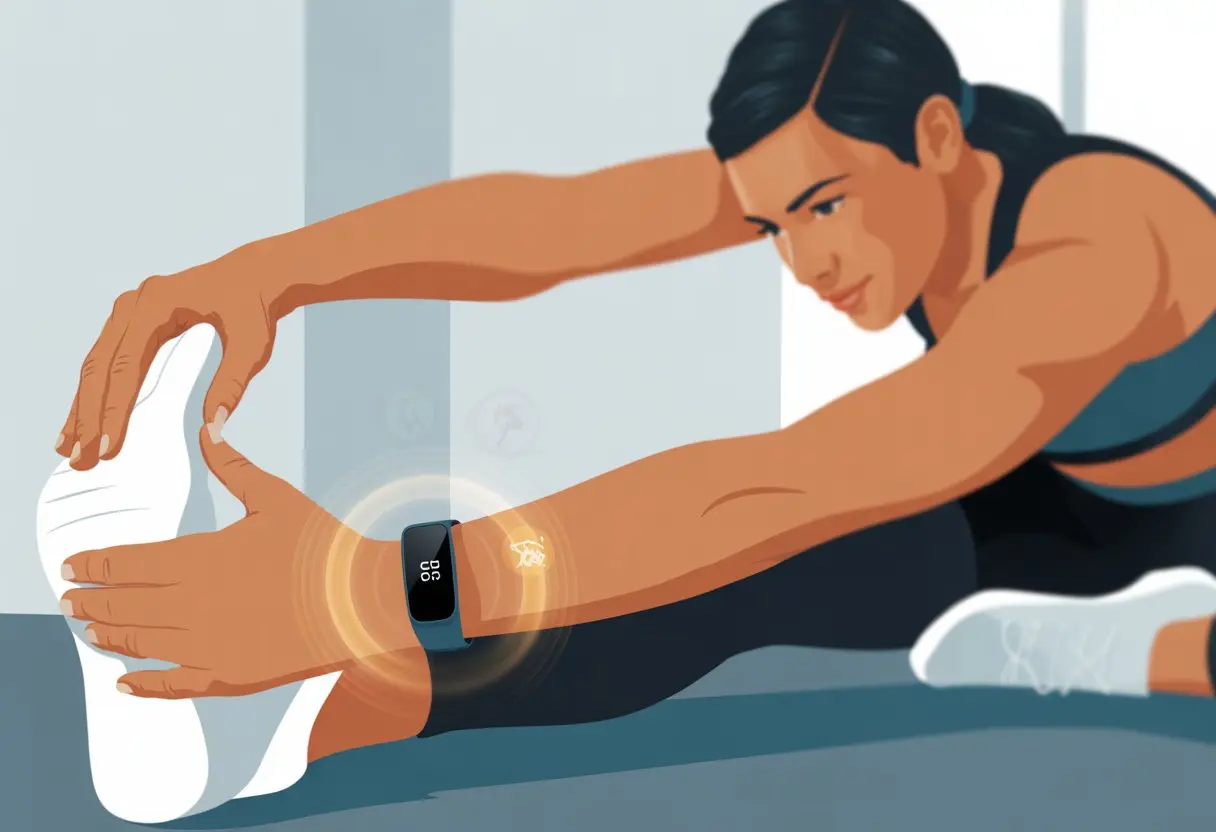
Let’s be real—most of us don’t remember to stretch until our muscles complain louder than the coffee maker in the morning. But what if our fitness tracker could actually make stretching feel like a legit part of our day instead of some annoying afterthought?
We can use a fitness tracker to track our stretching by picking workout types like yoga or Pilates, logging our time, and checking out our progress. It’s honestly easier than trying to touch our toes after hours at a desk.
With just a few taps, we start, stop, and save our stretching sessions—even if the tracker doesn’t have a “stretching” button. No more guessing how long we held that hamstring stretch before our legs went numb.
We finally make stretching count, and our gadgets handle all the boring numbers for us.
Let’s check out the best ways to use our fitness trackers for stretching. Maybe, just maybe, we’ll remember to loosen up more often.
It’s time to stretch smarter, not just harder!
Getting Started With Fitness Trackers for Stretching
Fitness trackers aren’t just for counting steps or timing our runs. They can actually help us build a stretching routine we might stick with—unless we forget to charge them, which, let’s be honest, happens.
Choosing the Right Fitness Tracker
Before our wrists just become fancy pedometers, we’ve got to choose the right device. Some models—like Apple Watch, Fitbit, and Garmin—do way more than steps and heart rate.
If you want to track stretching, look for trackers with workout modes like “Other,” “Stretching,” or “Mind & Body.”
Let’s not ignore the basics. Battery life matters. Nobody wants a tracker dying halfway through a stretch.
Water resistance is a bonus, especially if you hate taking it off in the shower—because you’ll forget to put it back on.
Notifications come in handy too. The tracker can buzz when it’s time to stretch (or when the group chat is popping off). Not every tracker fits every routine, so check the app’s workout options before you buy.
Initial Setup and App Pairing
Once we pick our fitness bestie, it’s setup time. Most trackers pair with our phones over Bluetooth.
Usually, we just download the manufacturer’s app, turn on Bluetooth, and follow those bouncing instructions.
Enable notifications so we don’t miss reminders to stretch—or, you know, pizza delivery alerts. During pairing, we add info like age, weight, and activity goals.
This helps the device give us feedback that’s at least close to accurate.
Here’s a tip: some trackers and apps—like Apple Health or Fitbit—let us label our workout as “Stretch” or “Other.” When we start a stretch session, pick the right type so our data doesn’t look like we just got up for a snack.
Understanding Tracker Features
Not all trackers handle stretching the same way. Some record heart rate, others just track time, and a few estimate calories burned (don’t expect miracles there).
Features like guided sessions or reminders can help us stay on track.
If our tracker doesn’t have a stretching mode, we usually pick “Mind & Body” or “Other.” More advanced apps—like Garmin Connect or Fitbit’s app—sometimes include follow-along routines or let us schedule reminders.
For more stretching ideas, the Bend app is a solid option with routines for every stiff joint.
Let’s also check out daily and weekly summaries. They show our progress—so we know if we’re actually getting bendier or just ignoring the tracker’s gentle nudges.
Why Track Your Stretching Routine?
If we don’t track our stretching, we end up stuck in the same pose, wondering why we’re still stiff as a board. Fitness trackers help us see real improvements, keep us honest, and sometimes remind us that yes, we really did only stretch for two minutes (not the “twenty” we claimed).
The Science Behind Stretching and Flexibility
Stretching sounds simple, but there’s legit science behind it. When we stretch regularly, our muscles get the message to loosen up.
This makes moving around easier and helps cut down on tightness. The Mayo Clinic says stretching boosts flexibility and improves our range of motion in joints.
There are two types of stretches:
Static stretches: Hold a stretch for a few seconds
Dynamic stretches: Move your body through a full range of motion
Both help with flexibility. Dynamic stretches warm us up, while static ones cool us down. Tracking each stretch and how long we hold it helps us figure out what works—and keeps us from skipping leg day again.
Measuring Range of Motion With a Tracker
A lot of trackers now record how well we move. Measuring our range of motion with a tracker feels like having a mini coach on our wrist (minus the whistle).
Some smart trackers and AI-powered apps spit out reports based on our stretching, tracking progress and helping us stick with plans. AI-powered stretching apps are getting pretty popular.
With a tracker, we can see how far we reach, how long we hold, and if we’re actually improving. We get real data instead of just guessing we’re more flexible because our jeans fit better.
It’s also a great excuse to brag about finally touching our toes.
Warming Up: Get Ready to Stretch
Let’s not leap into splits like we’re Olympic gymnasts. Our muscles need some love first.
A proper warm-up gets blood flowing, wakes up our joints, and gives us a better shot at looking coordinated (and not pulling something important).
Dynamic Stretching Techniques
Forget standing still and thinking about lunch—dynamic stretches are way better. We keep moving, which gets our heart rate up and boosts blood flow.
This helps us feel less stiff and lowers the chance of getting hurt.
Here are some favorite dynamic stretches:
Leg swings: Stand tall, hold a wall, and swing your leg back and forth like a confused pendulum.
Arm circles: Windmill your arms both ways—pretend you’re about to fly.
Skipping in place: Not just for kids. Skipping gets us warm and kind of happy.
Torso twists: Rotate left and right to loosen your spine. (Don’t whack anyone nearby.)
Let’s be honest, we can’t trust our lazy side to decide when we’re warmed up. Our fitness trackers save the day.
We can watch our heart rate climb, count steps, and time activities. Most trackers let us start a custom warm-up, so we can log those minutes.
Here’s what to watch for:
Heart rate: Shoot for about 50-60% of our max. If we’re breathing heavier but can still chat, we’re good.
Temperature: If we’re a little sweaty, it’s working.
Movement duration: Keep those dynamic stretches going for at least 5 minutes. Most trackers let us set a timer or mark intervals.
When the numbers go up, we know we’re ready. It’s basically like having a tiny cheerleader—just without the pom-poms.
Want more ideas? Try this quick warm up before you stretch.
Tracking Static Stretching Like a Pro
If we want to get serious about static stretching, we can’t just wing it. We really see progress when we pay attention to time, reps, and reminders (because, let’s face it, we all get distracted).
Monitoring Duration and Repetitions
Let’s get real: holding a static stretch for the right amount of time actually matters. Most fitness trackers have timers or a stopwatch, so we don’t have to count “one Mississippi” anymore.
Experts say to hold each stretch for about 15 to 60 seconds and repeat it 2 to 4 times per muscle group.
If our tracker lets us, we log these details after each set—now we have stats to brag about.
Setting Reminders for Your Routine
We’ve all said, “I’ll stretch later,” and then totally forgot. That’s where our fitness tracker steps in.
We set daily or weekly reminders right on our wrist—no more relying on our goldfish memory.
Notifications pop up with a buzz or beep, nudging us to get moving. Some trackers let us schedule reminders for different stretches—hamstring in the morning, shoulders after lunch.
If our tracker syncs with an app, we can set custom notifications for all our static stretches.
It’s just way easier to stick to a routine when we get reminders. We don’t have to remember; we just stretch.
Advanced Techniques: Active Stretching and Custom Routines
Using a fitness tracker for stretching can really level up our flexibility. With a few tricks, we can track, plan, and improve how we stretch—without turning into a pretzel by accident.
Creating Custom Stretching Programs
Let’s be honest: our bodies are all different. If we follow a one-size-fits-all routine, we might stretch our hamstrings but totally ignore those tight hip flexors from sitting all day.
That’s where fitness trackers help.
These gadgets let us log specific stretches, track how long we hold them, and remind us if we “accidentally” skip something. Many trackers work with apps that let us create custom routines for stretching before a run or cooling down after a walk.
We can name the routine (“No More Stiff Hamstrings,” anyone?), set durations for each stretch, and even schedule them—basically letting our phones boss us around for our own good.
Let’s just make sure we’re honest in the app—pretending to be flexible doesn’t actually make us flexible, sadly.
Incorporating Active Stretching for Recovery
Active stretching isn’t just lying on the floor while our limbs scream for mercy. We move a joint through its range of motion using our own muscles.
Basically, we become human rubber bands, but there’s at least a point to it. This kind of stretching helps us recover and keeps us loose between workouts.
Our fitness trackers buzz every so often, nudging us into quick active stretch breaks—especially when we’ve been sitting so long our legs forget they exist. Hip circles and walking lunges? Those work well.
Some trackers come with timers and reminders, so we actually stick with it (well, most of the time).
With a little tech (and maybe some motivation), we can bounce back faster and keep up with our activity goals—without yelping every time we reach for our toes.
Using Fitness Trackers for Runners and Athletes
Fitness trackers aren’t just glorified step counters. They’re like tiny coaches that live on our wrists.
They show us real stats, track calories burned, and remind us when it’s time to stop pretending to stretch and just do it.
Stretching Before Running
Before we bolt out the door pretending we’re marathon pros, stretching actually matters. Our fitness trackers can set timers for dynamic stretches—leg swings, hip circles, arm circles, you name it.
Most trackers let us log custom activities, so we don’t skip our five minutes of pretending to be a rubber band.
The heart rate monitor helps us see if our bodies are waking up or if we’re still basically asleep. If the heart’s not at least a little awake, maybe add another stretch.
Some fitness trackers give feedback on flexibility or movement range, which is perfect if you love numbers and bragging rights.
When we use the activity log, we can see every stretching session. Future us will be grateful, and honestly, it just feels more legit as a runner.
The best part? Now we have numbers to show how much “work” stretching really is, which totally justifies that post-run snack.
Preventing Injuries Like Runner’s Knee
Fitness trackers act as digital reminders not to overdo it, helping us dodge runner’s knee. They track running patterns, distance, and even stride, giving us a heads-up before our knees start complaining.
We can set step goals and heart rate limits, making it less likely we’ll do something wild like doubling our mileage in a week. Trackers help us stick to smart training plans, which means more running, less limping.
Some models track recovery, sleep, and even our awkward walking posture. If our tracker nags us to stretch or rest, maybe it’s right.
Runners tend to forget to slow down, but a good tracker keeps us honest. That way, we can keep burning calories without burning out our knees—one stretch at a time.
If you want advanced features, something like the Garmin Venu 3 can log rounds, track heart rate, and support all kinds of training modes. There’s a whole thread on best wearables for CrossFit and athletes if you want to dive deeper.
Stretching, Strength Training, and Your Tracker
Let’s be honest, we all want to crush our workouts and still touch our toes without making weird noises. Fitness trackers help us see exactly how much we’re moving, recovering, and maybe even how much we groan.
Tracking Recovery After Strength Sessions
After a sweaty strength session, we have to let our muscles recover. Fitness trackers do more than count steps—they show us how much activity we’ve done and if we’re actually resting enough.
Most trackers display stats like heart rate, calories burned, and how long we stay in certain heart zones. Watching recovery stats can help us notice when we’re too tired for another bench press or push-up.
Some fancy trackers even remind us to stretch or rest, like a tiny coach that never loses its voice.
When we track recovery, we make sure we’re not just working hard, but also getting the most from every session. We can log stretching as a separate workout or tack it onto our strength sets. No hamstring gets left behind.
Integrating Stretching With Other Activities
Why let stretching be a solo act? Our trackers let us mix stretching with other activities.
We can start with strength moves, swipe on the watch, and add stretching time without missing a beat. That way, all our effort stays in one tidy workout record.
Some trackers don’t have a “stretching” button, but we can use “other workout” or just squeeze stretching between sets. This way, our total activity adds up, and calories burned from stretching don’t slip away.
Here’s a quick list for mixing stretching in:
Warm up: Log gentle dynamic stretching as “warmup.”
During sets: Add quick stretches between strength moves.
Cool down: Mark post-workout stretching as “cool down” or its own activity.
Stretching isn’t just for gymnasts or yoga pros. When we track it, we get credit for every reach, lunge, and dramatic yawn.
Sleep, Recovery, and Stretching Data Insights
Our fitness trackers are basically tiny coaches that never sleep (and at least they vibrate instead of yelling at us). By checking our sleep quality and recovery data, we can figure out if we’re stretching at our best or just pretending not to nap on the yoga mat.
Analyzing Sleep Stages and Their Impact
Getting real sleep isn’t just about lying still and drooling on the pillow. Trackers help by showing how long we spend in light, deep, and REM sleep, making us rethink those “just one more episode” nights.
This matters, since stretching with tired muscles is like asking a sun-baked rubber band to bend. Looking at our sleep stages helps us see if we’re getting enough deep sleep to repair sore muscles.
When deep sleep is low, stretching can feel tougher and less effective. As we improve sleep, our muscles recover faster, so each session feels less like a struggle.
Our gadgets show us patterns over time. If we keep missing deep or REM sleep, it’s probably smart to adjust our stretching or take bedtime seriously.
Some folks use this data to plan gentler stretches on days after poor sleep—honestly, a smart move. Want more details? Forbes has fitness tracker advice.
Monitoring Resting Heart Rate and Recovery
Resting heart rate isn’t just another stat to ignore. It actually tells us how ready our bodies are for action—or for reaching our toes without yelping.
Fitness trackers show our resting heart rate trends. When it’s higher than usual, that might mean our bodies are stressed or not fully recovered.
On those days, pushing for a tough stretch probably isn’t the brightest idea.
We can track recovery by watching if our resting heart rate returns to normal after sleep or a rest day. Combining this with sleep data helps us know when to hold back and when to go all-in on stretches.
Some trainers even ask about these numbers to help clients avoid overdoing it—yes, that means us too. There’s a good discussion on recovery and wearable data if you want to see how others use this info.
Working With Professionals
Sometimes we need a little expert help. Partnering with trained professionals can help us get the most out of our fitness tracker and stretching routine, especially if touching our toes feels like an Olympic event.
Collaborating With a Physical Therapist
When your hamstrings start complaining or your shoulders make those weird popping noises, maybe it’s time to see a physical therapist. These folks really know their stuff about safe, effective stretching.
They’ll put together a routine that actually works for your cranky muscles. You’ll also learn how to track progress in a way that makes sense, not just guesswork.
Why work with a physical therapist?
Personalized Plans: No more fumbling around, wondering which stretch to pick. Your therapist hands you a plan that’s made for you.
Form Checks: Forget awkwardly checking your form in the mirror. Therapists watch your technique and help you fix what’s off.
Progress Tracking: You can team up with your fitness tracker to keep an eye on your range of motion and flexibility. Want proof you’re getting bendier? Just check your stats and notes—kind of satisfying, honestly.
Let’s be real—working with a physical therapist means fewer mystery aches, smarter progress tracking, and less wincing every time you get up off the floor.
Hi, my name is Garrett Jones, and I am a tech enthusiast. I enjoy researching the new tech that has been released, and have a vast knowledge of the best tech to purchase.
From a young age, I have always had a big interest in technology, and this blog is an extension of that interest. Through this blog, I hope to provide others with all of the information they need regarding tech options to consider, and things such as compatibility. Some of the different items I will be discussing include headphones, smartwatches, and how to fix common issues.