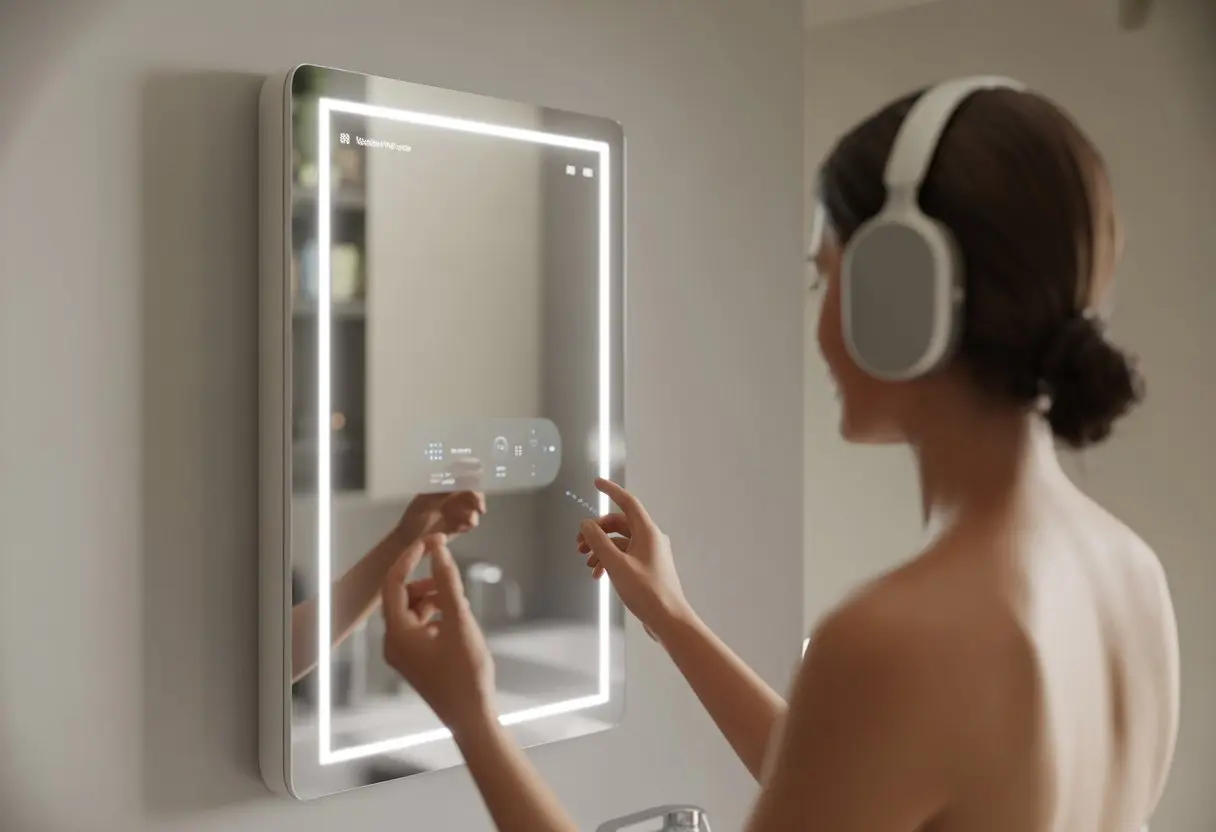
Let’s be real—most of us want to blast our favorite playlist while brushing our teeth, but we don’t want to wake up the whole house. To use Bluetooth headphones with a smart mirror, just pair them through the mirror’s Bluetooth settings, and only you will hear the music or calls—no more awkward family concerts. It might sound high-tech, but honestly, it’s not rocket science once you get the hang of it.
We’ve all had those mornings when we crave privacy, but our mirror insists on sharing our tunes with everyone. Pairing Bluetooth headphones with a smart mirror can save everyone from your questionable early morning music choices.
No more battles over bathroom speakers or worrying about neighbors hearing your motivational podcasts. Whether you’re getting ready for school, work, or just enjoying some “me time,” knowing how to link Bluetooth headphones to a smart mirror means you control the sound—and maybe keep your sanity.
Understanding Bluetooth Headphones and Smart Mirrors
Let’s talk about what actually makes our headphones and mirrors “smart.” We’ll break down how Bluetooth works, what’s happening inside those futuristic mirrors, and whether you should bother with wireless or RF for your bathroom concerts.
What Is Bluetooth Technology?
Bluetooth is like invisible string cheese for your gadgets. It lets your devices talk to each other by sending short-range radio waves.
When you use Bluetooth headphones, you pair them with other Bluetooth devices—like your smart mirror—so you can listen to music or news wirelessly while brushing your teeth.
Bluetooth usually covers about 30 feet. You don’t have to stand right next to the mirror—unless you’re admiring your bedhead. Most modern headphones and mirrors use Bluetooth 4.0 or newer, which is quick and saves energy.
Pairing is pretty painless, and you don’t have to mess with wires. Bluetooth sips power, so your headphones last for hours, and your mirror won’t waste much electricity just to play a song.
How Do Smart Mirrors Work?
Smart mirrors are basically regular mirrors with a brain. They use displays behind the glass to show stuff like weather, time, or news headlines.
Many have speakers, touch controls, and, of course, Bluetooth connectivity.
These mirrors can talk to your phone or tablet. You can stream music, take calls, or control apps just by tapping the mirror (and, yeah, probably leaving a few fingerprints). Bluetooth mirrors can display calendars and emails while you wash your hands, so you can stay productive without leaving the sink.
To use Bluetooth headphones, just activate Bluetooth on both devices, put the mirror in pairing mode, and connect. It’s like setting up a high-tech date between your ears and your reflection.
Wireless vs. RF: Which Is Better for Your Reflection?
When people talk about wireless audio, they usually mean Bluetooth, but there’s also RF (radio frequency). RF headphones use a separate transmitter and work well for TVs or long-range listening, but they typically don’t connect directly to smart mirrors.
Bluetooth is just easier for everyday use. You don’t need extra hardware, and it works with nearly every modern smart mirror. RF can go farther, but do you really want to listen to your mirror from three rooms away? That’s a little odd.
Here’s a quick comparison:
Feature
Bluetooth
RF
Range
Up to 30 feet
Up to 300 feet
Setup
Simple pairing
Needs transmitter
Compatible w/ mirrors
Yes
Rarely
Battery life
Usually longer
Can vary
For singing in the shower, Bluetooth usually wins. It’s simple, wireless, and perfect for belting out tunes while you strike your best superhero pose.
Checking Compatibility Between Your Devices
Bluetooth sounds like magic, but not all smart mirrors or headphones get along. Before you start blasting your favorite songs in the bathroom, make sure your devices actually work together.
A little checking now saves a lot of frustration later.
Finding Out If Your Smart Mirror Supports Bluetooth
First, let’s skip the wild goose chase. Not every smart mirror comes with Bluetooth. Some are just shiny glass with lights, while others are fully loaded.
Check the manufacturer’s box, manual, or company website. Look for a “Bluetooth” logo or a specs table. If you don’t see anything obvious, poke around in the system menus or settings. Sometimes mirrors hide the feature in a mobile app.
If you want to be extra sure, try pairing it with your phone. If the mirror shows up in your Bluetooth menu, you’re good. If not, it’s probably just a fancy mirror.
When in doubt, check the product page or watch a quick YouTube walkthrough to see how pairing works.
Identifying Supported Bluetooth Versions
Bluetooth versions matter more than you’d think. The version affects things like connection speed, audio quality, and whether your devices will even talk to each other.
Check both your smart mirror and headphones. Are they both Bluetooth 4.0 or newer? If you’ve got Bluetooth 5.0 or above, even better—usually means better range and sound. It sounds impressive to say, “Yeah, mine’s Bluetooth 5.1,” right?
If the versions don’t match, you might run into problems. For example, an old Bluetooth 2.1 speaker probably won’t sync with a brand-new mirror. Some features, like fast pairing or low-latency audio, only work if both devices support them.
Manuals usually list this stuff, but you can always check the official specs online or shoot a quick email to support.
OEM Features That Might Trip You Up
Here’s where things can get weird: OEM tricks. That’s the “Original Equipment Manufacturer”—the folks who made your device—and sometimes they add their own twists.
Some brands use custom Bluetooth setups, so they don’t always play by standard rules. A mirror from Brand A might only work with certain headphones or need a special app (because, of course, we all need another app).
You might run into “proprietary modes,” which really just means, “Sorry, not universal.” Features might be locked behind accounts, firmware updates, or buried in odd settings.
If you hit a wall, check the FAQ, reach out to support, or browse user forums. Sometimes it’s not you—it’s them. And yeah, it can feel like you need detective skills to outsmart the quirks of smart home devices.
Pairing Bluetooth Headphones With a Smart Mirror
Connecting Bluetooth headphones to a smart mirror is totally doable, as long as you follow the right steps. Prepping your headphones and navigating the sometimes clunky mirror interface can actually be pretty painless if you know what to expect.
Preparing Your Bluetooth Headphones for Pairing
Let’s not start with frustration—your headphones need to be in pairing mode first. Every model is a little different, but usually, you hold down the power or Bluetooth button until you see some dramatic blinking lights. That’s your sign they’re ready to connect.
Quick checklist:
Make sure your headphones are charged. Dead batteries = no music.
Find the right button. If there are five, look for the Bluetooth symbol or the main power button.
Hold it for a few seconds, usually 3–5, and watch for those lights.
If your headphones ask for a PIN (like 0000 or 1234), keep it handy, but most newer ones skip that step.
Setting Your Smart Mirror to Pairing Mode
Now, let’s get the smart mirror ready. Head to the settings menu on the mirror’s display. If you see a Bluetooth menu, that’s your jackpot.
Tap to open the Bluetooth settings. Turn on Bluetooth if it isn’t already, then select “Add new device” or whatever matches. The mirror will start searching.
Wait for your headphones’ name to pop up, then tap to connect. If the mirror asks, approve the pairing request by tapping “Pair” or just saying “yes” (robot voice optional).
Some smart mirrors use third-party controls or a phone app, so if the built-in way doesn’t work, check the manual or look up a video walk-through.
Tip: Keep your headphones close to the mirror while pairing. Walls, pets, and your neighbor’s WiFi won’t help.
Troubleshooting Pairing Disasters
When things go sideways (and they will), don’t panic. If the headphones don’t show up, just turn both devices off and on again. It’s amazing how often that fixes things.
Quick fixes for common headaches:
Headphones not showing up: Make sure they’re still in pairing mode. Restart both devices.
No sound: Check the mirror’s sound output settings. Sometimes it stubbornly tries to use its own speaker.
Endless pairing loop: Clear the Bluetooth device list from the mirror and start over.
Too many nearby Bluetooth gadgets: Turn off other paired Bluetooth devices, including phones or tablets.
If you’re still stuck, look up model-specific help or step-by-step videos. Or, honestly, see if a teenager can set it up for you.
Customizing Audio and Mic Features
Getting great sound from Bluetooth headphones with your smart mirror isn’t magic—it just takes a few tweaks. Adjusting mic and audio output settings helps you avoid echoes and keeps your DJ sessions private.
Enabling and Adjusting Microphone Settings
After you connect your Bluetooth headphones, you might wonder, “Can people hear me singing in here?” To check, enable the mic. Most smart mirrors have a mirror app or built-in settings for this.
You’ll usually find mic options under Audio & Microphone or Bluetooth Devices.
Some mirrors automatically use the headphones’ built-in mic. Others make you select it. You might need to grant microphone permission, especially for video calls or voice commands.
If the mirror refuses to recognize the mic, a quick restart after pairing can help.
If you want to avoid echo during calls, select your Bluetooth mic as the main input. On some setups, like when screen mirroring for Zoom or FaceTime meetings, the default can be wrong, so double check the input device.
Managing Audio Output Sources
Picking where our music or podcasts play really cuts down on confusion. Some mirrors send sound right to our connected headphones, but others need a little push.
We can usually spot audio output options in the settings menu—look for Audio Output or Sound Destination.
Here’s a table to help us decide what to pick:
Situation
Recommended Output
Private calls
Bluetooth headphones
Group listening
Built-in mirror speaker
Secret DJ-ing
Bluetooth headphones
If we use apps like AirPlay or Miracast, they often push audio to headphones by default. Still, it’s worth checking the app’s sound settings just to be sure. Headphone screen mirroring guides suggest this step.
Switching outputs lets us jam out without bugging anyone—or hiding the fact we’re replaying our favorite song for the tenth time.
Using Accessories and Apps for Enhanced Experience
Keeping Bluetooth headphones charged is basically rule number one for enjoying our smart mirror. There’s nothing more annoying than the dreaded “battery low” beep right in the middle of a good song.
Let’s look at what helps us dodge that situation and keep the music going.
Leveraging USB and Charging Accessories
USB gadgets save the day more often than we admit. A sturdy USB charging cable is always handy, letting us top up our headphones from a wall plug, laptop, or even the mirror’s own USB port (if we’re lucky enough to have one).
It pays to stash extra cables in places we use the mirror—bathroom, bedroom, wherever. We’ve all done the last-minute cable scramble, and it’s never fun.
Some mirrors have built-in USB ports, which makes charging super easy after pairing up our devices.
Here’s a quick table for useful USB accessories:
Accessory
What It Does
Why We Love It
USB-C Cable
Charges newer headphones
Fast and reliable
Micro-USB Cable
Charges older headphones
Still useful
USB Hub
Charge multiple devices
Group project!
Power Bank to the Rescue: Stay Charged!
Power banks are lifesavers when outlets are nowhere to be found. Tossing a small power bank in our mirror zone can really save us, especially if we forgot to charge our headphones overnight.
We can even share with a friend—waiting for the light to turn green on our headphones isn’t so bad together. Just remember to recharge the power bank, or we’ll both be out of luck.
Lightweight models slip right into a pocket, so charging on the go is always an option.
Some power banks come with both USB-C and micro-USB plugs, so everyone’s headphones get juice without cable drama. Our mirror jams don’t have to stop.
The Role of the Charging Case
Charging cases pull double duty: they store our wireless earbuds and charge them while we’re not using them. Just drop the headphones in, and the battery gets a boost while we brush our teeth or practice dance moves in front of the mirror.
A fully charged case can refill our buds several times before it needs a plug. Even if we miss an overnight charge, the case usually has us covered for morning routines.
Some cases come with quick charging or built-in battery displays, which is a win for anyone who’s forgetful about charging.
Charging cases are super portable, so tossing them in our bag means our music (or podcasts) are always just a tap away.
Smart Mirror Apps and Cross-Device Tricks
Honestly, using Bluetooth headphones with a smart mirror is already cool, but adding apps and phone tricks really levels things up. With the right tools, we can stream, control, and DJ our way through daily routines.
Using the Aliexpress App and Other Smart View Tools
We all love a good bargain, but it’s wild that the Aliexpress app can double as our tech helper with some mirrors. Certain smart mirrors let us mirror or cast our phone’s content right onto the glass.
If we use features like Smart View (on Samsung phones), we can broadcast video, apps, or music straight to the mirror.
Here’s how it usually goes:
Turn on screen mirroring on the mirror.
Open Smart View or a casting tool on the phone.
Connect the devices (sometimes there’s a code).
Open the Aliexpress app and browse deals, check orders, or get notifications—all while brushing our teeth.
With Bluetooth headphones on, audio from the phone (music, video, whatever) streams privately. Not every mirror works with every phone, so we might need to adjust sound settings on the mirror or phone.
Once it’s set up, it feels like we have a shopping assistant in the bathroom—without the awkward sales pitch.
Playing DJ With Your Mobile Phone
Why put up with silence when we can DJ for ourselves? Pair Bluetooth headphones to the smart mirror, and suddenly our phone controls the whole music scene.
We connect our phone’s streaming apps (Spotify, Apple Music, whatever) to the mirror via Bluetooth or a smart mirror app. Some mirrors even show album art, track info, and controls right on the glass.
Need a new playlist? The phone’s our remote. Want to switch to the mirror’s speakers? Just change the output in settings.
If a call interrupts, our headphones keep it private. And, let’s be real, who hasn’t tried beatboxing in front of their own reflection?
Bluetooth headphones and smart mirrors sometimes just refuse to cooperate, leaving us wondering if our tech is pranking us. Keeping these two in sync isn’t too hard, but when things go sideways, here’s how we handle it.
Connectivity Gremlins and How to Exorcise Them
Everyone’s had Bluetooth headphones suddenly drop out mid-song. One sneaky reason? Mirrors! The silver coating on some smart mirrors can mess with RF (radio frequency) signals, which really messes with Bluetooth connections.
Here’s our fix-it list:
Stay charged: Dead headphones do nothing. Always check the battery.
Line of sight: Keep headphones close to the mirror, and keep big metal stuff out of the way.
Re-pair devices: If nothing else works, forget and reconnect the headphones. Bluetooth can be moody.
Stay calm, try these tricks, and sometimes just moving a step to the side does the trick.
When Wireless Just Isn’t: Falling Back on Plan B
Sometimes, wireless just gives up. If all the Bluetooth magic fails, we need a backup.
If the smart mirror or headphones support a wired connection, grab an old-school audio cable.
Here’s how we do it:
Check for a headphone jack on the mirror.
Find the right cable: Most Bluetooth headphones work as wired headphones with a regular 3.5mm cable.
Plug in and play. No Bluetooth drama, just tunes.
Going wired keeps the music flowing and saves our sanity when Bluetooth is having a bad day.
Safety Tips and Best Practices
Let’s be real, using Bluetooth headphones with a smart mirror can feel like juggling a tiny, high-tech circus. If we don’t keep an eye on our gear, we risk dead batteries, ruined headphones, or even a sticky mess from spilled shampoo.
Keeping Devices Powered Without a Meltdown
Headphones are only as good as their charge. There’s nothing worse than our playlist dying halfway through a routine.
Here’s what actually helps:
Always keep a charging case nearby, especially for wireless earbuds.
Use a power bank if there’s no outlet near the mirror. But watch out for tripping on the cable—grace isn’t always our strong suit.
Label all chargers—USB-C, Lightning, Micro-USB, doesn’t matter. Otherwise, we play “Guess the Charger,” which gets old fast.
Unplug chargers when not in use. It saves energy and keeps cords from turning into bathroom spaghetti.
A simple charging routine chart can save us from morning disasters:
Device
Charger Type
Charging Frequency
Headphones
USB-C
Every 2-3 days
Charging Case
USB
Weekly
Power Bank
USB
When low (check LED)
Safe Cleaning and Storage Habits
Water and electronics? They just don’t get along. Headphones aren’t rubber duckies, and let’s be honest, your mirror’s Bluetooth receiver definitely isn’t looking for a bubble bath.
Try these cleaning tips:
Grab a soft, dry cloth and wipe down your headphones. Don’t spray cleaner right onto your electronics—it’s just asking for trouble.
If headphones or the mirror get splashed, unplug them fast and dry them off with a towel. Let them air out before you even think about turning them back on.
Lint in the charging port is the worst. Keep a toothpick or soft brush nearby to gently clear out USB ports and charging cases.
When it comes to storage, being picky actually helps:
Toss headphones into their charging case when you’re done. If you leave them on the counter, they’ll probably take a bath or get toothpaste all over them.
Keep headphones away from the sink, shower, or anywhere your pet goldfish might wander.
A little routine goes a long way. Keep your bathroom gear dry, charged, and honestly—ready for your next mirror karaoke session.
Hi, my name is Garrett Jones, and I am a tech enthusiast. I enjoy researching the new tech that has been released, and have a vast knowledge of the best tech to purchase.
From a young age, I have always had a big interest in technology, and this blog is an extension of that interest. Through this blog, I hope to provide others with all of the information they need regarding tech options to consider, and things such as compatibility. Some of the different items I will be discussing include headphones, smartwatches, and how to fix common issues.