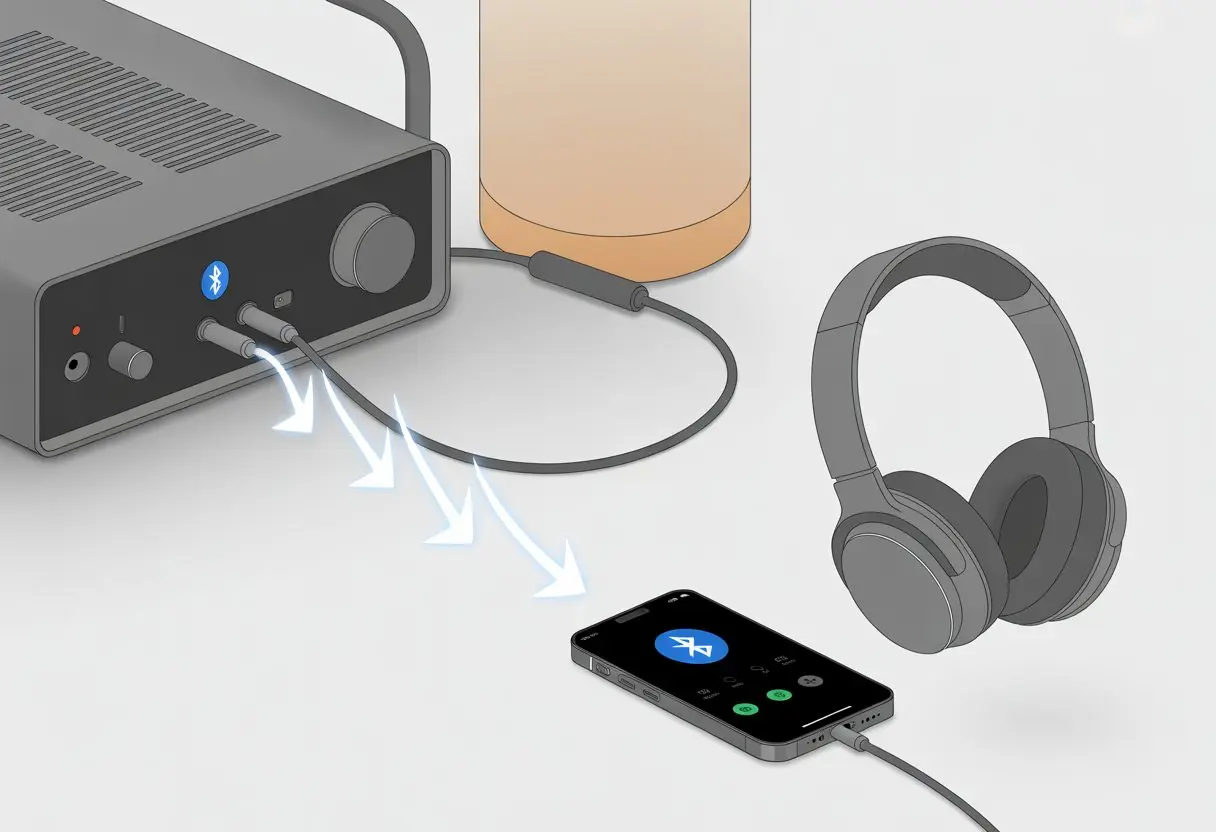
Let’s be real—sometimes, we just want to crank up our music through Bluetooth headphones without tripping on wires or waking the dog. Connecting Bluetooth headphones to an amplifier isn’t rocket science. All we really need is a Bluetooth transmitter plugged into the amp’s output, and then our wireless headphones finally get an invite to the party (learn more about transmitters for amps).
If you’ve ever stared at that jungle of cables behind your amp and thought, “There’s gotta be a better way,” you’re definitely not alone. We’ve all fought the spaghetti wires, and honestly, it’s a pain.
Going wireless makes late-night listening, movies, or jam sessions so much easier—and, let’s admit, it just feels cooler.
Ready to break free from tangled cords, weird adapters, and headphone acrobatics? Here’s how we can ditch the mess and make our music life a whole lot smoother (with less clutter).
Understanding Bluetooth Audio Connectivity
Bluetooth is the magic sauce that gives us audio freedom and convenience. Our favorite headphones now play music, podcasts, and game sounds, all thanks to this wireless tech that fits in our pockets.
Tangled cables? Yeah, those are mostly history.
What Is Bluetooth Technology?
Honestly, if Bluetooth didn’t exist, we’d all still be tripping over headphone wires. Bluetooth is a wireless standard that tons of consumer electronics use—speakers, phones, amps, you name it.
It works like a short-range walkie-talkie for digital stuff.
Bluetooth barely uses any memory or power, which is why it’s everywhere—from fitness trackers to amps. The classic range is about 10 meters, so you can dance around the living room and not worry about the music cutting out.
If the signal drops, it’s probably not Bluetooth’s fault—maybe you just tried to microwave a burrito.
Bluetooth sends data in little packets, keeping things in sync so music and instruments sound right—even if you’re just lounging around in pajamas.
How Wireless Transmission Works
Wireless transmission is a bit like passing notes in class, just way less likely to land you in trouble. In Bluetooth audio, our amp (if it can send wirelessly) pairs with our headphones, creating a private channel.
The amp encodes the audio and sends it out. The headphones pick it up, decode, and play it.
That’s how we get rid of wires and interruptions.
Now, here’s the catch—latency. That’s the delay between when the amp sends sound and when our ears actually hear it.
Bluetooth isn’t instant. Too much latency can make movies or games feel off—like a bad lip-sync. Lower-latency Bluetooth models help, but honestly, it’s never perfect.
Bluetooth Versions and Codecs Explained
Bluetooth has had more updates than my phone’s apps. Each new version gets faster and more reliable. Bluetooth 5.0 is everywhere now, with better range and fewer dropped connections.
Different codecs handle how audio gets compressed and sent. SBC is the basic one, AAC is great for iPhones, aptX and aptX HD are favorites for Android people, and LDAC is the choice for hi-res audio fans.
Here’s a quick look:
Codec
Quality
Latency
Notes
SBC
Average
Medium
Universal compatibility
AAC
Good
Low to Medium
Used by Apple devices
aptX
Good
Lower
Better for Android, faster
aptX HD
Higher
Low
HD audio support, faster
LDAC
Excellent
Low to Medium
High bitrate, hi-res audio
Getting the right codec means clearer sound and less lag. But, both devices have to support the same codec—otherwise, all that fancy tech just sits there, unused and kinda sad.
Can You Connect Bluetooth Headphones Directly to an Amplifier?
Let’s get to the point: Can you just pair your Bluetooth headphones with your amp and call it a day? Most amps will just stare back at you blankly.
Let’s break down why, with some real-life examples.
Why Most Amplifiers Lack Built-In Bluetooth
Most amplifiers were built back when wires ran the show and Bluetooth was just a dream. Standard amps usually give us RCA outputs, 1/4” headphone jacks, and speaker posts—nothing wireless.
Even some fancy home theater amps skip Bluetooth. It’s not a conspiracy (as far as we know!); Bluetooth needs special chips and software that most amps don’t bother with.
Wired audio also has less delay and better quality, which matters to audiophiles and gamers.
So, if we want to use Bluetooth headphones with an amp, we grab a Bluetooth transmitter and plug it into the amp’s output. That’s it—no time machine needed.
Popular Amplifier Brands and Models
Let’s do a quick amplifier roll call. The Bose Music Amplifier? It streams audio, but you can’t pair Bluetooth headphones directly—no built-in Bluetooth output yet.
Yamaha amps, especially their classic receivers, might have Bluetooth for input (so you can send music from your phone), but not for headphones. You can stream to the amp, but not from it.
The big brands—Denon, Sony, Marantz—usually skip wireless headphone support, too.
Here’s a cheat sheet:
Brand
Bluetooth for Headphones?
Notes
Bose
No
Bluetooth for streaming, not output
Yamaha
No (mostly)
Some input, not output
Denon/Sony
No
Needs a transmitter
If you want wireless headphones, you’ll need a Bluetooth transmitter plugged into your amp. Until then, your amp isn’t talking to your headphones.
Getting Ready to Pair: Required Devices and Accessories
Don’t just start plugging stuff in randomly. We need the right gear to connect Bluetooth headphones to an amp (and avoid “No Signal” blinking at us). The right transmitter and setup mean the difference between smooth jams and dead silence.
Choosing a Bluetooth Transmitter or Receiver
First, we figure out if our amp is a tech marvel or, well, “vintage” (aka: stubbornly Bluetooth-free). If it doesn’t have Bluetooth, we’ll need a Bluetooth transmitter. This handy gadget plugs into the amp’s headphone or RCA output.
Some transmitters are plug-and-play—USB or wall-powered. Look for models with aptX Low Latency if you want to avoid audio lag that makes you look like you’re lip-syncing a bad TikTok.
If you want to get Bluetooth audio into the amp (so friends can stream music from their phones), you’ll need a Bluetooth receiver instead. Which one you need depends on the direction you want the sound to travel.
But if you just want wireless headphones, the transmitter is your new best friend.
Setting Up the Bluetooth Function
After unboxing your new Bluetooth device, it’s time for the “pairing dance.” Connect the Bluetooth transmitter to your amp with a cable—usually a standard headphone cable or an RCA to 3.5mm adapter.
Press and hold the button on the Bluetooth device. A little LED should start blinking like it’s trying to get your attention.
Now, put your Bluetooth headphones into pairing mode—hold the power button for a few seconds until another light flashes.
If the devices find each other, the lights stop blinking. If not, move them closer or just turn them off and on again (classic tech fix, right?).
Step-By-Step: Connecting Bluetooth Headphones to an Amplifier
You’ll need three things: Bluetooth headphones, a Bluetooth transmitter, and your amplifier. The whole process only takes a few minutes—unless you lose the transmitter under the couch (again).
Plugging in the Transmitter
Honestly, the Bluetooth transmitter is the real VIP here. Most amps just don’t have Bluetooth powers built in, so we have to help them out.
Grab the transmitter and plug it into the headphone jack or RCA outputs on the amp—whichever is available.
If your amp is old-school, you might need an adapter. The transmitter usually connects with a basic cable, nothing wild.
Once it’s hooked up, power on the transmitter. Some use USB, others have batteries. If you see a blinking light, you’re good to go.
Grab your Bluetooth headphones and get them ready. Usually, you just hold down the power or Bluetooth button until you hear a beep or see a flashing light.
If your headphones start saying “pairing mode,” don’t worry—you’re not hearing things.
Some headphones have fancier controls, but honestly, don’t overthink it. Just look for the pairing light.
Patience helps—Bluetooth can be stubborn if you rush. If you get stuck, check the manual (no shame there). Keep the headphones close to the transmitter so the signal doesn’t get shy.
Initiating Pairing on the Amplifier or Transmitter
Now, let’s make the Bluetooth connection happen. Most transmitters go into pairing mode right when you turn them on.
If not, press and hold the button until the lights start flashing like a mini-rave.
Your headphones should pop up for the transmitter to connect. Sometimes you’ll hear a beep, or see both blinking in sync—like they just found their perfect match.
If it doesn’t work, restart both devices. That usually does the trick faster than blaming the Wi-Fi.
No more tripping over cords or pretending the static is “part of the song.” Now you can rock out in true, cable-free Bluetooth style.
Fine-Tuning Audio and Troubleshooting
Connecting Bluetooth headphones to an amplifier isn’t always as easy as we hope. We usually bump into sound hiccups or pairing drama.
To get the best audio and dodge common headaches, let’s get into what really works.
Using Bluetooth Settings for Better Sound
Honestly, nobody wants to listen to laggy or tinny tunes. We should check if our amp or Bluetooth transmitter supports high-quality codecs like aptX, aptX HD, AAC, or LDAC.
These codecs make music sound smoother by sending more data than the old SBC standard. Many transmitters and amps have a settings mode, sometimes tucked away like a hidden diner menu.
We can usually use buttons or a companion app to switch codecs, adjust latency, or tweak output volume. If our headphones also offer these settings, both sides need to agree—if the amp sends LDAC but the headphones only know AAC, they’ll settle for the lowest option, like plain toast instead of avocado.
It’s a good idea to keep our Bluetooth device list clean. Too many old connections can throw the amp off and cause it to ignore our headphones, which feels pretty annoying.
Solving Pairing Issues and Common Problems
Pairing can be a pain—random blinking lights, passkey requests, and we’re left guessing. Most headphone and amp combos use “0000” or “1234” as the default Bluetooth passkey.
If that doesn’t work, we’ll probably have to dig out the manual, if we can even find it. If there’s no sound, we should double check the amp is sending to the right output.
Sometimes, a Bluetooth transmitter needs to be plugged into a specific jack, like “record out.” If nothing’s working, try resetting both devices or removing them from the device list and pairing again.
Bluetooth sometimes just takes its sweet time, so patience helps. Walls, microwaves, and even nosy neighbors’ Wi-Fi can mess with our connection too.
If things still don’t work, a simple headphone extension cable might save the day (and our sanity), according to amplifier users. We might not love it, but hey, at least we’ll have sound.
Advanced Features and Control Options
With Bluetooth headphones and a good amplifier, we don’t just get sound—we get some pretty clever features. We can juggle several gadgets, control everything from the couch, and sometimes even use an app.
Our music setup gets smarter, not harder.
Managing Multiple Bluetooth Devices
Sometimes, we own more headphones and gadgets than we probably should. When we try to pair different Bluetooth devices to one amplifier, we quickly realize not all amps handle multitasking well.
Some amplifiers allow multiple pairings, but only connect to one device at a time. If our amp supports dual connections, we might listen with two sets of headphones or play music from a friend’s phone.
Switching between devices can be tricky.
What helps:
Check if the amp remembers paired devices.
Find an easy way to clear the device list if it gets crowded.
Some receivers use a “pairing” or “Bluetooth” button—expect some blinking lights as it cycles through options. If the amp doesn’t allow enough connections, a Bluetooth splitter or transmitter for dual headphones can help.
We don’t have to cross the room just to turn down the volume anymore. Many modern amplifiers let us use a smartphone or even a computer as a remote.
If our amp supports this, there’s usually a free app from the brand—Yamaha and Denon are popular for that. With these apps, we can change volume, play or pause music, and tweak audio settings.
All this without leaving the couch.
Key benefits:
Control the amp from wherever we are.
Adjust inputs, switch Bluetooth devices, and power things on or off.
Some apps let us create playlists, adjust EQ, or set a sleep timer.
If we’re connecting through a computer, some brands offer desktop software, making audio management pretty easy. But, honestly, don’t blame us if everyone ends up fighting over the phone like it’s a TV remote.
Apps for Enhancing Connectivity
Apps can turn our Bluetooth headphone setup from basic to impressive. The most common helpers are official apps (like Yamaha MusicCast Controller or the Bose app), which handle connections, let us choose devices, and troubleshoot issues.
Device Management: Rename, add, or remove Bluetooth headphones and speakers.
Audio Customization: Access EQ, surround modes, and volume controls.
Multi-room features: Send audio to several devices at once, if supported.
Bonus: These apps often deliver updates for the amplifier. So when Bluetooth gets another upgrade, our amp can keep up—unless it still thinks a “dongle” is just a weird typo for “triangle.”
When Things Go Wrong: Getting Technical Help
Sometimes our Bluetooth headphones just refuse to play nice with the amplifier, no matter how many times we reboot everything. When that happens, we need to know what kind of backup to call in—human or digital—before our jam session turns into a tech disaster.
When to Call an Electronics Specialist
Some problems are just too stubborn for us to fix by button mashing or guessing. If we hear weird noises, can’t get any sound, or the Bluetooth connection keeps dropping—despite trying different adapters and cables—we might need to call in a pro.
Here are some signs it’s time for an electronics specialist:
Persistent static or buzzing that just won’t stop
No sound even though everything looks plugged in
Bluetooth adapters not pairing or disconnecting instantly
Strange smells or overheating (seriously, don’t ignore that)
A tech can use tools we don’t have, open up gear safely, and spot hardware failures. Specialists know amp brands and Bluetooth gadgets better than most of us.
Our local guitar shop might have someone, or at least they can point us to a good tech. Better a specialist than turning our living room into an accidental “smoke machine” show.
Online Support and Resources
Sometimes, you don’t need a fancy toolbox—just Wi-Fi and a bit of patience. Online tech support sites like JustAnswer or manufacturer chat support can walk you through common amplifier and Bluetooth headaches, one step at a time.
Reddit’s another goldmine. People there have asked about Bluetooth headphone issues with amps and shared what actually worked for them. You’ll also find YouTube packed with repair tutorials.
Most amp makers keep troubleshooting pages handy, too. If you want direct help, chat support teams will guide you through pairing settings or suggest firmware updates.
Honestly, with a bit of online sleuthing, you can usually fix connection problems or those weird noises at home. And hey, if you don’t end up talking to your amp out loud, that’s a win in itself!
Hi, my name is Garrett Jones, and I am a tech enthusiast. I enjoy researching the new tech that has been released, and have a vast knowledge of the best tech to purchase.
From a young age, I have always had a big interest in technology, and this blog is an extension of that interest. Through this blog, I hope to provide others with all of the information they need regarding tech options to consider, and things such as compatibility. Some of the different items I will be discussing include headphones, smartwatches, and how to fix common issues.