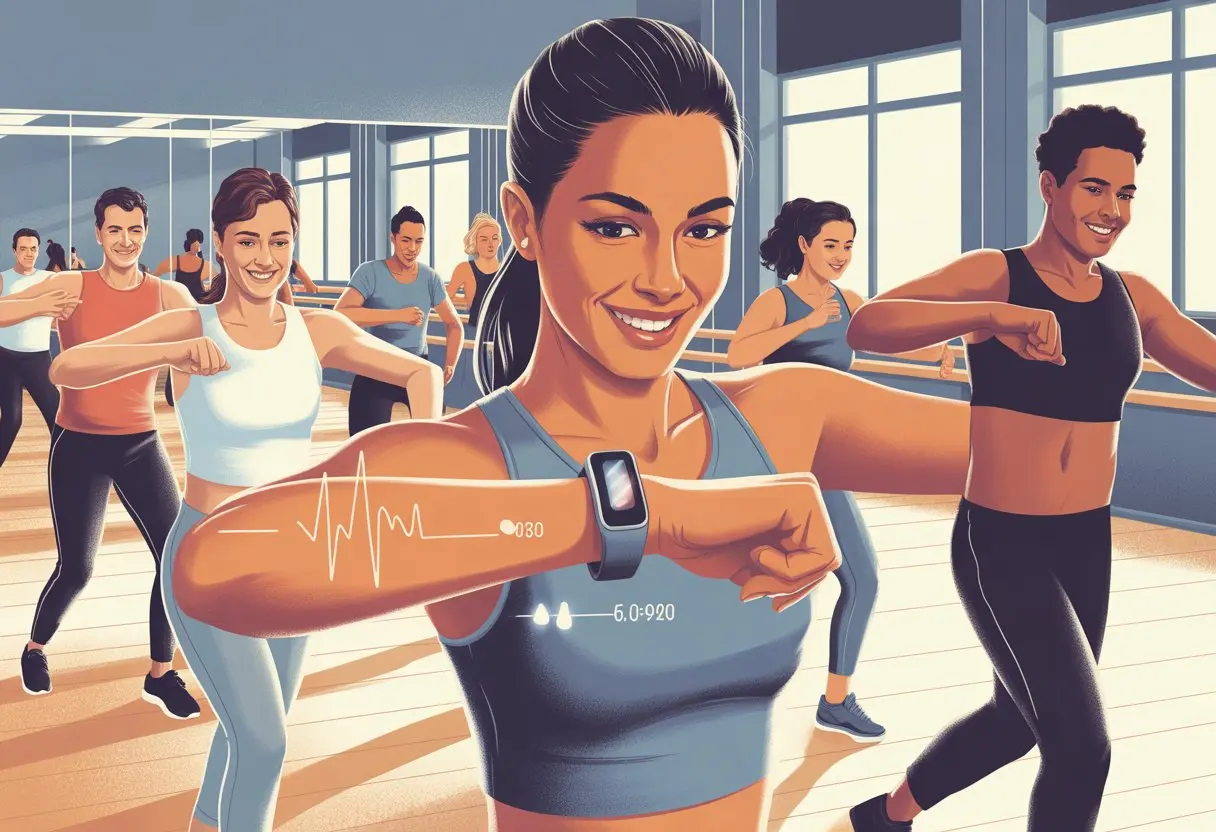
Let’s be honest—dancing is way more fun than running laps, right? But when it comes to tracking those dance moves, it’s easy to wonder how our fitness tracker actually keeps up.
We can use a fitness tracker for dance workouts by picking or adding a dance activity mode on our device, or logging the workout as cardio and editing it later to say it was dancing. Honestly, it’s easier than learning a TikTok routine, and there’s something so satisfying about seeing those numbers climb.
Most fitness trackers these days are smarter than our old gym teachers ever dreamed. With just a few taps, we can watch our heart rate skyrocket during the cha-cha or see our step count soar after a living room dance-off.
Some trackers, like the Garmin Lily 2, even let us set the dance type. That way, our salsa doesn’t get mistaken for breakdancing.
We all want credit for every silly move and dramatic twirl. Once we set up our tracker, we can finally prove just how much energy (and maybe talent?) we’re burning out there.
Getting Started With Your Fitness Tracker
Let’s make sure our fitness tracker is ready to catch every step, spin, and shuffle we bring to our dance workouts. It’s worth taking a moment to pick the right device, set it up, and check which dance types it supports.
Choosing the Right Wearable
Honestly, not every fitness tracker can keep up with our wild footwork. If we want to track heart rate, calories, and workouts, we need a device that supports dance fitness features.
Popular picks include Apple Watch and some Garmin models. The Apple Watch covers a bunch of dance workouts, and for Garmin fans, only certain trackers like the Garmin Lily support a dedicated dance activity.
We should also pay attention to comfort and the strap. If our tracker pinches during a plié, it’s just not worth it. And let’s be real—battery life matters, because sometimes dance parties last way longer than expected.
Device Setup and Syncing with Workout Apps
Time to get things rolling. We connect our wearable to our phone using the official app—Apple Fitness for Apple Watch, or Garmin Connect for Garmin devices.
Pairing lets our stats sync automatically, which makes tracking progress (and bragging) a breeze. We should double-check if our workout app tracks dance as an exercise, or if we need to add it ourselves.
Some devices let us customize alerts for heart rate zones or dance duration. These little reminders help us stay safe and motivated—plus, it’s like having a tiny coach right on our wrist.
Understanding Supported Dance Types
Let’s be real, not every device knows the difference between ballroom and breakdancing. The Apple Watch gives us options like “Dance” or even more specific styles in its list.
Garmin devices are a bit more limited, but the Garmin Lily lets us pick the type of dance. It even asks for our dance type and song count. That makes our workout data a bit more on point.
If our tracker doesn’t have our favorite dance, we can use “Aerobics” or “Other workout.” Not perfect, but hey, calories burned are calories burned—even if our tracker can’t handle our wildest cha-cha.
Selecting Dance Workout Modes
Let’s be honest—fitness trackers aren’t just for running and cycling anymore. We want our salsa, hip-hop, and even goofy living room dances to count too!
There are ways to make sure all our moves get tracked, from cha-cha to Bollywood steps.
Dance-Specific Tracking Options
Some fitness trackers now come with actual dance workout options. With the Garmin Lily 2, we can pick a dance type when logging activity, including Latin, Zumba, and even salsa and ballroom dancing.
These modes try to capture our unique movement patterns and estimate calories in a way that fits twirling hips more than pounding pavement.
Other trackers, like the Mi Band 9, tuck dance features inside the “Workout” menu under “More.” It’s a bit of a digital treasure hunt. Once we find them, we can track styles from Zumba to Bollywood. Honestly, it’s way better than pretending “Aerobics” covers our best moonwalk.
Setting Up Custom Workouts
Not every tracker is up to speed with the latest dance craze. Thankfully, most let us build custom workouts.
On Fitbit, for example, we open the app, head to the exercise screen, and start a new workout. We can log it as “dance” or something close—like “other exercise.”
Pick a fun name, hit start, and suddenly our kitchen waltz gets the respect it deserves.
This way, every spontaneous dance break counts—even if our tracker isn’t quite Bollywood-ready.
Tracking Different Dance Styles
Different dance styles make our hearts work in different ways. Ballroom calls for slow, smooth moves; hip-hop is all about high energy and quick jumps; Latin or salsa heats things up with fast footwork.
Some trackers let us pick from a bunch of styles. The Mi Band 9, for example, offers up to 14 dance types, so we can match our groove.
If our tracker only has a general “dance” mode, we can keep a cheat sheet handy. Example:
Dance Style
Intensity Level
Ballroom
Low-Moderate
Hip-Hop
High
Latin/Salsa
Moderate-High
Bollywood
Moderate
The more specific we get, the more accurate our calorie and step counts usually are.
Activity Timer for Choreography Sessions
Timing our routines is seriously helpful, especially when we’re learning choreography or prepping for a group performance. The activity timer on most fitness trackers acts like our stage manager, keeping us on beat.
On the Fitbit app, we tap the stopwatch icon before starting. Other trackers usually hide a “timer” or “interval” feature in the workout menu.
When we’re teaching or learning new steps, this feature keeps us on track—so we don’t keep saying “just one more” when our legs are screaming, “enough!”
With the timer, we can:
Set intervals to break down tough moves
Track each routine’s length
Celebrate when we finally nail that tricky Bollywood move
We might not win “Dancing with the Stars,” but at least our tracker gives us stats to brag about.
Monitoring Your Performance During Dance Workouts
When we dance, our bodies move in all sorts of ways that can throw even the fanciest fitness tracker off. To get useful info, we should focus on how our trackers measure heart rate, calorie burn, and all those steps and hip shakes.
Tracking Heart Rate Like a True Rhythm Star
Our heart rate can climb fast during a dance workout, even if the moves don’t look too wild. Most fitness trackers use a heart rate monitor with sensors that shine a light through our skin to count the beats.
It sounds like magic, but it’s just science doing its thing.
When we track heart rate, it helps to tighten our watch a bit so it doesn’t slide around during twirls. Good readings help us avoid underestimating or overestimating our effort.
Most trackers show heart rate zones (like fat burn or cardio), so we know when we’re working at just the right intensity.
If our tracker shows graphs or trends, we can spot which songs make our hearts work hardest. Next time, we’ll know when to pace ourselves and when to go all out.
Measuring Calorie Burn for Each Song
Fitness trackers use a mix of our heart rate, age, and movement to estimate calories burned. Their algorithm isn’t perfect, but it tries to figure out how much energy we burn with each shimmy.
The higher our heart rate and the more we move, the more calories we torch.
We can check calorie burn per song by watching the live count tick up during each track. It’s kind of fun to compare which dance styles or favorite songs push us the hardest.
If we love numbers, making a quick table to track songs and calories burned helps us find patterns in our routines. Here’s a simple example:
Song Title
Calories Burned
Uptempo Pop
45
Latin Groove
50
Slow Ballad
28
Counting Movements and Steps With Precision
Fitness trackers use a built-in accelerometer, which acts like a dance detective, sensing arm swings and jumps. The tracker adds up these movements to count steps, spins, and even those random jazz hands.
Dance can be tricky, though. Sometimes the tracker mistakes wild arm waves for steps, or misses fancy footwork if our hands stay still.
Still, most modern trackers do a decent job tracking steps, even with our wildest moves. Some devices let us pick a dance activity type, which can help with accuracy—see more tips from other users at activity settings for dance classes.
If we want real precision, we can try wearing the tracker in different spots—like our non-dominant wrist—or double-checking the step count after our playlist ends. It’s a good way to make sure every moonwalk gets counted.
Analyzing Workout Intensity and Progress
When we use a fitness tracker for dance, we get a flood of numbers and shiny graphs. The real trick is finding meaning in all that data, especially when we want to see progress or compare dance to other cardio like running.
Interpreting Dance Metrics
Our fitness tracker loves numbers—heart rate, calories, and steps. The heart rate sensor acts like our hype man, letting us know when we’ve hit those peak dance zones that leave our legs shaking.
Heart Rate Zones: Most trackers show graphs or colors so we can tell if we’re cruising or sprinting across the living room.
Calories Burned: Let’s be real, this is the stat we’re all watching. While the numbers are estimates, they help us compare dance to other workouts.
Steps & Movement: Since dance isn’t just moving forward, these numbers can get wild on nights when we go full moonwalk.
A lot of us like to check trends in the app—seeing how much more we can dance now compared to last month. Some trackers even give us feedback, so we know when it’s time to kick it up a notch.
Comparing With Other Cardio Activities
Ever tried convincing yourself—or that skeptical friend—that dance fitness actually counts as real exercise? It’s easier when you stack up the stats against things like running, cycling, or even walking.
Activity
Avg. Heart Rate
Calories (per hour)
Steps Logged
Dance Fitness
Medium-High
250–400
High (lots!)
Running
High
400–600
Very High
Cycling
Medium
300–500
Low
Walking
Low-Medium
200–300
Medium
Most trackers throw our numbers side by side, so we can see how a sweaty salsa stacks up against a run. Honestly, it’s great for setting goals—or just proving that, yes, dancing to 90s hits in the kitchen actually counts as cardio.
Some trackers let us tag the activity, so the app won’t mix up our dance fitness with a jog across town. If you’re curious, there’s more detail in the guide on tracking gym member workouts.
Using Badges and Challenges for Motivation
Let’s be honest: we love shiny things, even if they’re just digital badges. Fitness trackers seem to know exactly how to motivate us—they’re always tossing out new badges for longest streak, most calories burned in a dance, or smashing a step goal while dancing.
Apps run weekly or monthly challenges, and we can jump into a dance fitness challenge or compete with friends. That “Best of the Week” badge on a dance day? It’s worth bragging about, at least until next week rolls around.
Seeing our name on the leaderboard suddenly makes us want to moonwalk every night. Chasing badges and crushing challenges keeps our motivation up—even if the only one cheering is our cat.
Optimizing Rest and Recovery Between Dance Sets
Getting the right amount of rest after dancing keeps our bodies fresh. If we skip breaks, our full-body workout turns into a full-body disaster (plus, maybe some accidental flops on the floor).
Managing Rests Between Songs
Let’s be real—dancing is exhausting, and that break between songs isn’t just for fixing our hair. It’s our mini-vacation.
With a fitness tracker, we can set up vibration alerts or timers for rest periods. This stops us from jumping into the next set too soon and burning out early.
It makes sense to check our heart rate and use it as a “rest-o-meter.” We can let our heart rate drop closer to normal before the next routine.
Experts say using a rest timer helps us get the most from each session. If our tracker supports active rest, a little light movement between sets can boost circulation without wiping us out.
Quick Tips:
Set a timer for each break.
Watch your heart rate for recovery.
Do gentle stretches or shake-outs—no sprints.
Utilizing Calorie Alerts for Recovery
Let’s talk about calorie alerts—those little reminders that tell us we’re burning calories like crazy. Most new fitness trackers show calorie burn stats, and we can set thresholds.
When we hit a certain number, it’s a signal to pause, hydrate, and maybe grab a snack (hey, we earned it). Watching calorie burn helps us know when our bodies need a break.
The best fitness trackers track calories for dancing, so we can rest based on output, not just time. This keeps our energy balanced and stops us from running out of steam before the last song.
Here’s what works:
Set calorie alerts for intervals (like every 100 calories).
Pause to hydrate and check your form.
Listen to those calorie notifications—the tracker might know better than our stubborn dance brain.
Maximizing Results From Dance Fitness Sessions
Getting the most from dance fitness takes more than just fun moves and loud music. We need clear targets and a few smart tricks to boost calorie burn every session.
Setting Personal Fitness Goals
Let’s be honest—setting a random goal like “become TikTok famous by July” doesn’t really count here. Our tracker needs something more solid.
Pick goals that are specific and actually measurable. Maybe we want to hit a certain step count or keep our heart rate in the “sweaty but happy” zone for at least 30 minutes.
We can use our tracker to log each dance session. Track heart rate, calories burned, and how long we’re moving.
Watching these numbers shows us if we’re on track or if it’s time to step up our cha-cha game. Celebrating small wins, like hitting a weekly step target, keeps us motivated.
If we want our tracker to show numbers that make pizza nights less guilt-inducing, why not try out some new ways to ramp up calorie burn? High-energy dance styles like hip-hop or salsa can really get your heart pounding.
You could even toss in some intervals—mix slower moves with sudden, faster bursts. Picture a slow waltz, then suddenly breaking into a fast twerk. Sounds fun, right?
Make sure you wear your tracker snugly, but don’t cut off your circulation. That way, it’ll pick up more accurate readings.
Keep an eye on your heart rate zones. Hanging out in the “cardio zone” usually means you’ll burn more calories. Honestly, a fitness tracker can help keep you in the right training zone, and that’s pretty helpful if you’re looking for better results.
Try taking short breaks instead of long ones. That keeps your session intense and your body burning more calories.
Switch up your moves regularly. Rotating dance routines can challenge new muscles, and let’s face it—it keeps things interesting. Boredom? Not on our watch.
Hi, my name is Garrett Jones, and I am a tech enthusiast. I enjoy researching the new tech that has been released, and have a vast knowledge of the best tech to purchase.
From a young age, I have always had a big interest in technology, and this blog is an extension of that interest. Through this blog, I hope to provide others with all of the information they need regarding tech options to consider, and things such as compatibility. Some of the different items I will be discussing include headphones, smartwatches, and how to fix common issues.