So, you bought a Fitbit to track your sleep because counting sheep just wasn’t cutting it. You want to know if those restless tosses and marathon snoring sessions actually show up on your wrist each morning.
Fitbit sleep tracking is about 72% to 88% accurate at telling if you’re asleep, but only about half that good at spotting your deep sleep or REM dreams. So maybe don’t brag to your friends just yet about your “perfect” sleep score.
Fitbits are like that friend who means well but gets half the details wrong. The gadgets can tell when you’re asleep pretty well, but if you want the exact nitty-gritty about your deep sleep or that tricky REM stage, it might mix things up.
Professional sleep studies using fancy wires and machines still do a better job. Fitbit’s accuracy just can’t fully match those scientific tests.
Seeing your sleep trends on your Fitbit can be fun—and sometimes helpful—unless, of course, learning your new “Nightly Animal” is actually a cranky raccoon stresses you out more than it helps.
How Fitbit Sleep Tracking Works
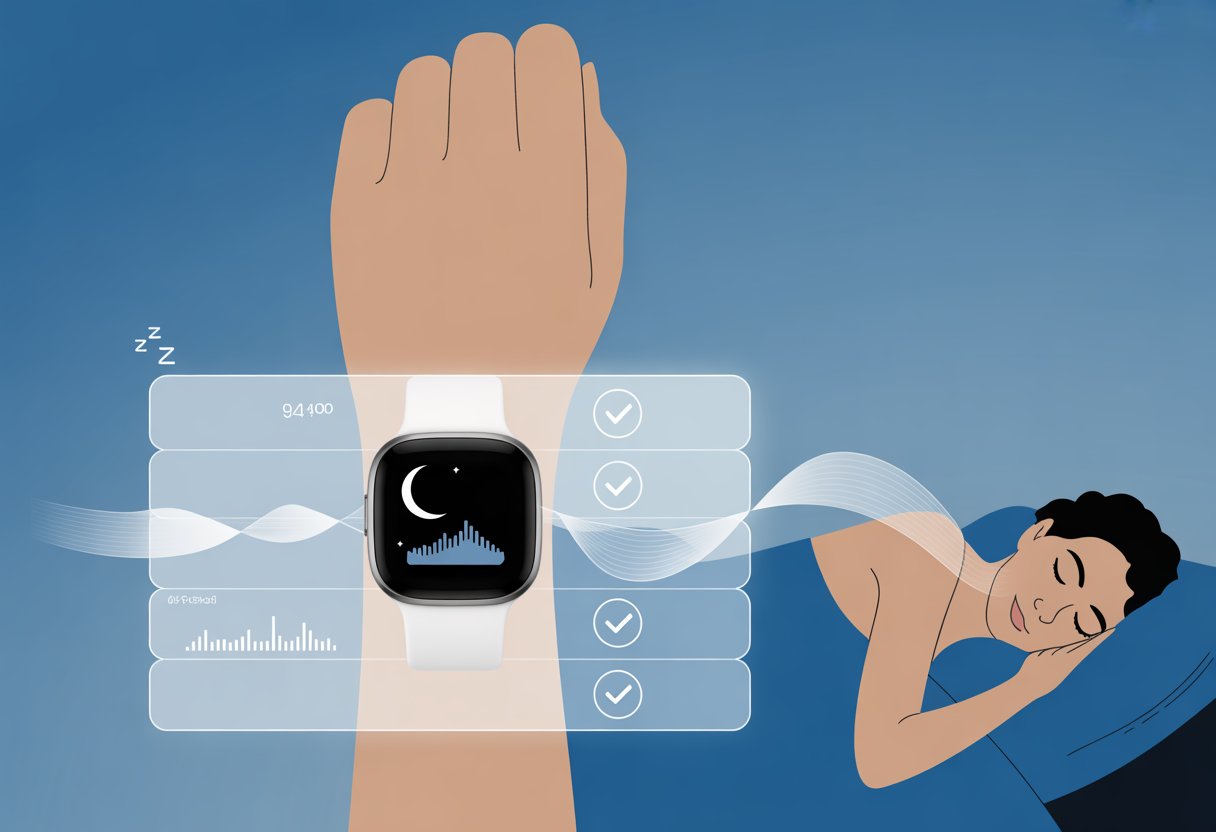
Fitbit turns your wrist into a mini sleep lab. It checks your heart rate, senses your movement, and even guesses when you’re drooling on your pillow.
All this data shows up in the Fitbit app, making you wonder if you really slept that badly. Sometimes, the results are a little too honest.
Overview of Sleep Data Collection
Fitbit checks your sleep with sensors in its device. It keeps track as you snooze, using its built-in accelerometer and heart rate monitor.
Whenever you toss or turn, your Fitbit is taking notes. It collects information in small chunks all night.
This includes how often you wake up, how much you move, and how steady your heartbeat is. If you get up for a midnight snack, yes, it’ll know.
You can expect data on when you actually fall asleep, when you wake up, and the different parts of your sleep cycle. This data helps you spot your bad bedtime habits, like binge-watching or scrolling through your phone in the dark.
Role of Heart Rate and Motion Sensors
Fitbit uses both a heart rate sensor and a motion sensor (called an accelerometer). The heart rate sensor tracks how fast your heart is beating while you sleep.
The motion sensor sees if you’re staying still or rolling around. It’s basically a quiet, wrist-mounted detective.
For sleep tracking, these sensors tag team. The heart rate sensor looks for changes that match your sleep stages.
When your heart slows down, you’re probably in deeper sleep. Quick changes can mean you’re dreaming or maybe being startled by a raccoon outside.
The motion sensor tries to catch all your ninja-level sleep moves. Less movement usually means deeper sleep, while tossing and turning could mean lighter sleep or you’re just fighting with your blanket.
Newer Fitbits combine this info to try to guess your sleep phase with around 69 percent accuracy every half minute.
Understanding Sleep Stages
Fitbit divides your sleep into several categories: Light, Deep, REM, and Awake. These aren’t just fancy words to make you feel smart.
Light sleep is where you spend most of your night. Your heart rate is steady, but not super low.
Deep sleep is when your body repairs and grows. If you don’t get enough, you may feel like a zombie.
Fitbit tries to spot this by finding times when your heart rate and movements are at their quietest. REM sleep is known for dreams.
Your brain gets active, and your eyes dart around, but your body barely moves. Fitbit uses your heart rate patterns and lack of movement to guess this stage.
Whenever you wake up for a bathroom break or to check your phone, Fitbit logs those moments, too. You’ll see them as spikes or breaks in your sleep chart.
Integration with the Fitbit App
When you wake up, your Fitbit quietly passes all your sleep data to the Fitbit app. It’s a handy way to see just how weird your nightly routine really is.
The app organizes your sleep info with graphs and daily, weekly, or even monthly summaries. You can set a sleep schedule and even get bedtime reminders, which feels a lot like your mom nagging you through your wrist.
The app can show how much time you spent in deep sleep, light sleep, and REM. You can also add notes—maybe you got woken up by a neighbor’s dog or spent the night worrying about homework.
The Fitbit app tries to use your data to help you spot patterns and improve your sleep habits. This makes it easier to brag or complain about your sleep at breakfast.
Measuring Sleep Tracking Accuracy
If you’ve ever woken up and argued with your Fitbit about how much sleep you got, you’re not alone. Understanding how Fitbit tracks your sleep means digging into tech, science, and yes—even how honest you are about falling asleep before midnight snack runs.
Sleep Data Validation Methods
To figure out if your Fitbit is on the mark, researchers compare how it tracks sleep to how doctors do. Labs use devices that measure brain waves, eye movement, and even leg twitches—like an overzealous lifeguard for your dreams.
This process is called polysomnography. Fitbit, by contrast, relies on sensors that track movement and heart rate.
When you’re as still as your phone’s battery at 4%, Fitbit calls it sleep. This method works, but it’s not perfect.
For heavy sleepers or wild nighttime dancers, the results might look very different than lab-grade reports. Here’s a quick breakdown:
Method
What it tracks
Level of detail
Polysomnography
Brain waves, eye/leg movement, breathing
High (medical-grade)
Fitbit
Movement, heart rate
Moderate
Polysomnography vs. Fitbit
Polysomnography is the gold standard for measuring sleep accuracy. Your head gets hooked up to enough wires to supply a small band, and experts watch you snooze.
Fitbit just straps on your wrist and hopes for the best. Studies find Fitbit’s sleep tracking is about 72-73% accurate when compared to these professional tests.
It scores high in sensing when you’re asleep but isn’t as sharp at detecting when you’re awake. Specificity, or catching those actual “wakeful” moments, lands lower—between 0.58 and 0.69.
So, if your Fitbit thinks you slept through your 3 a.m. snack raid, it’s probably just being polite.
User-Reported Accuracy
You probably wonder if most Fitbit users trust the sleep data they see. A lot of people say Fitbit is “very accurate”—especially if they don’t want to admit they fell asleep on the couch before the third episode.
It’s especially good at letting you track trends, such as getting less sleep when you binge-watch shows. But not everyone agrees.
Some users complain the device misses naps or confuses reading for actual sleep. A few love the detailed reports, while others only trust the extra “minutes awake” to mean time spent deciding whether to actually get up.
For most, Fitbit gives a good overview—even if the numbers aren’t perfect. If nothing else, tracking sleep might remind you to go to bed before midnight (no promises though).
Factors Influencing Results
Many things can affect your Fitbit’s accuracy. If you’re someone who stays really still while awake, Fitbit might think you’re catching z’s.
If you toss, turn, or do interpretive dance under the blanket, it might think you’re chasing sheep instead. Wearing the tracker loosely or on the wrong wrist can also mess with the readings.
Certain medications, sleep disorders, or even drinking caffeine late can throw things off. You may also want to note that Fitbit’s accuracy can drop for detecting short naps or disrupted sleep.
If you want the most accurate numbers, wear your Fitbit exactly how they recommend. Don’t drink a triple espresso at 9 p.m., and try to restrict any sleepwalking to non-wearable hours.
Breaking Down Sleep Stages Detected by Fitbit
Fitbit devices turn your nightly tossing and turning into colorful graphs. But how do these gadgets really sort out your sleep?
Here’s what you need to know about how your tracker handles different sleep stages and what those stats might mean for your bedtime bragging rights.
Detecting Deep Sleep
Deep sleep is when your brain waves slow down, your body repairs itself, and you completely ignore that pizza you ate right before bed. Fitbit tries to track deep sleep by picking up on your movement and heart rate.
That means if you wake up feeling like a superhero, double-check before thanking your stats. Most of the time, deep sleep is underestimated or mixed up with other stages.
Fitbit won’t replace a sleep lab with fancy sensors stuck to your head, but it gives you a general idea. If your tracked deep sleep time changes a lot from night to night, don’t panic—it happens!
Analyzing REM Sleep
REM (Rapid Eye Movement) sleep is the stage where you dream, process weird thoughts, and sometimes wake up to find your pillow nowhere near your head. Fitbit tries to spot REM sleep by looking at patterns in your heart rate and small movements.
According to independent testing, Fitbit tracks REM sleep with about 74% accuracy. This is better than deep sleep detection but not something you’d want to use for professional dream analysis.
If your dreams seem funnier than your data suggests, trust your instincts, not just the app. If your REM sleep seems low, it could be due to the device mixing up light sleep and REM.
Remember: more REM does not always mean better rest.
Light Sleep Versus Awake Time
Light sleep makes up most of the night. It’s when you can wake up easily—like when your cat decides to launch a midnight attack.
Fitbit tracks light sleep with around 81% accuracy, which is pretty solid for detecting those stretches of not-quite-awake, not-quite-asleep time. Awake time is a different story.
Many users notice Fitbit underestimates how often you’re tossing, turning, or just staring at the ceiling planning tomorrow’s snacks. The device may call some of this light sleep by mistake, so don’t worry if your “awake” numbers seem low.
Want to see your own numbers? You can check your sleep timeline using the Fitbit app’s graph.
Just remember, when in doubt, trust how you feel in the morning—even if your stats say you spent half the night in “light” suspense.
Impact of External Factors on Accuracy
Fitbit sleep tracking accuracy isn’t just about the device. Where you sleep, your stress levels, and even how tight that band sits can change your sleep data—sometimes for better, sometimes for worse.
Effect of Sleep Environment
The room you sleep in can make your Fitbit seem brilliant or, on bad nights, about as sharp as a goldfish. If your bedroom’s noisy—barking dogs, snoring partners, or a late-night pizza run—the tracker might mistake tossing and turning for deep sleep.
Temperature matters, too. Hot rooms can make you restless, so your Fitbit might think you’re awake when you’re just uncomfortable.
Light pollution from streetlights or glowing gadgets can mess with your natural rhythms and, by extension, your sleep tracking. For better results, try to make your space more sleep-friendly:
Keep the room dark and quiet
Adjust the temperature (cooler usually works best)
Ditch distracting light sources
Even with all that effort, your Fitbit can still get confused if a raccoon decides to raid your kitchen at 3 a.m. Life’s unpredictable.
Influence of Stress and Activity
If you’re stressed, your sleep data might look like a wild roller coaster. Stress keeps your body alert, even when you think you’re out cold.
This means your Fitbit could register extra periods of wakefulness or very light sleep. Unfortunately, your tracker can’t tell if it’s work stress or just excitement about pizza night.
A busy day, lots of exercise, or unusual activity can also impact how accurately your Fitbit measures your sleep stages. High activity might make you fall asleep faster.
On the flip side, late-night workouts could delay the signals that tell your Fitbit, “Hey, we’re sleeping now.” You can help your tracker by unwinding before bed—think deep breaths, funny cat videos, or telling your brain to stop worrying about tomorrow’s to-do list.
Wearing Habits and Device Fit
Your Fitbit likes a good hug—but not a death grip or a loose, floppy fit. If the band’s too tight, you might cut off circulation and wake up to weird marks on your wrist.
Too loose, and the sensors might only pick up “sleep” during your wildest dance moves. Proper fit means the device sits snugly but still feels comfy.
Wear it above the wrist bone, not so tight that you feel like you’re being arrested for bedtime crimes. The way you wear your tracker can improve accuracy:
Check band tightness before bed
Clean the sensors for good readings
Don’t swap wrists mid-sleep, unless you want to truly confuse the algorithm
Get these habits right, and your Fitbit may reward you with less mysterious sleep data. If not, at least your wrist will be comfortable.
Comparing Fitbit with Other Sleep Trackers
Picking a sleep tracker can feel like picking your favorite pizza topping—so many choices, so much at stake. Fitbit and Misfit both claim to help you understand your sleep, but they aren’t twins, and their accuracy and features don’t always match up.
Fitbit Versus Misfit
So, you want to see if Fitbit’s sleep data can beat what Misfit has to offer? Get ready for a friendly face-off.
Fitbit uses both heart rate data and movement to guess when you’re in light, deep, or REM sleep. Misfit, meanwhile, mainly tracks your motion.
Fitbit’s accuracy rates land between 86%–88% for sleep detection. It’s especially good at picking out sleep stages like REM and light sleep, according to some recent studies.
Misfit can tell if you’re moving or still, but can’t distinguish what kind of dreams you’re having about showing up to school in your pajamas.
What Sets Fitbit Apart
You probably don’t want guesswork when it comes to your sleep. Fitbit has a couple tricks up its sleeve that give it an edge.
Unlike Misfit, Fitbit connects heart rate info, movement, and sometimes even skin temperature to get a more complete look at your night. Want a chart that pretends to be a sleep scientist? Fitbit gives you that—plus sleep scores and graphs you can share to brag about your “perfect” sleep.
There’s even “sleep insights” that nudge you to hit the hay earlier (or just shame you for your midnight snacking). Fitbit also gets regular updates to improve accuracy and add new features.
If you want your device to keep learning, Fitbit’s a better bet. Fitbits are worn on the wrist, while some Misfit trackers clip to your shirt or go in your pocket, which can make them forget you’re asleep and not just very, very bored in a meeting.
Limitations of Competing Devices
Misfit and other trackers often rely just on movement data. This means they can’t always tell if you’re lying perfectly still awake, plotting revenge on your alarm clock.
They may say you’re asleep whenever you stop moving, even if your brain is running laps. If you want to know what kind of sleep you’re getting—light, deep, or REM—many trackers can’t help.
They don’t pick up heart rate or other signals needed for more accurate sleep staging. This can leave you with incomplete sleep data and lots of questions.
Some competing trackers don’t update their software often. If there’s a bug or if research uncovers a new way to measure sleep, your device might just ignore it forever.
Fitbit’s more frequent updates give it a small but real edge if you’re looking for the latest insights and better accuracy.
Limitations of Fitbit Sleep Tracking
Fitbit can track your sleep, but keeping expectations as low as your energy levels after a rough night is smart. A fitness tracker isn’t a magic sleep doctor, and sometimes its guesses are—let’s say—ambitious.
Challenges with Sleep Disorders
If you have a sleep disorder, don’t expect Fitbit to become your new sleep therapist. Devices like Fitbit use movement and heart rate patterns to guess your sleep stages.
They don’t measure your actual brain waves, which are key for diagnosing sleep disorders like insomnia, sleep apnea, or narcolepsy. Fitbit’s sensitivity in recognizing sleep is high, but its specificity is much lower.
It’s pretty good at catching when you’re sleeping but not so great at telling if you’re awake but lying very still—like when you’re pondering the meaning of ceiling tiles at 3 AM.
For people with unusual sleep patterns, this problem only gets worse. Researchers have found that when you have more sleep stage transitions, Fitbits can lose accuracy.
If you have sleep disorders, you still need real medical tests—Fitbit is like that guy at trivia who knows a lot, but not quite enough.
Common Sources of Error
Your Fitbit’s sleep tracking has a few weak spots. It relies on motion and heart rate, but it can mistake your Netflix binge for a nap if you sit very still.
Think about all those hours spent staring blankly at your phone—you might be “sleeping” according to your tracker, but your eyeballs beg to differ.
Accuracy drops further if you get up during the night. More transitions between sleep and wakefulness can fool the tracker even more.
Fitbit models can have high sensitivity (over 90%), but specificity can be as low as 13% according to studies—meaning lots of chances for error. You’ll get better results if your sleep is simple and you don’t toss, turn, or start breakdancing at midnight.
Fitbit is great at tracking general trends and showing you pretty graphs, but it can confuse “human statue” with “peaceful sleeper.” If you want perfect data, you’ll have to wire your skull to a sleep lab.
Tips to Improve Your Fitbit’s Sleep Tracking Accuracy
Fitbit’s sleep tracking can be helpful, but you’ll only get the best results if you manage some key details. Little things like when you go to bed, and exactly how you wear your device, can make a much bigger difference than you’d think.
Optimizing Sleep Schedule
Keeping a regular sleep schedule does more than impress your grandmother. When your bedtime and wake-up time are consistent, your Fitbit’s sleep tracking accuracy gets a much-needed boost.
If you go to bed at 1 a.m. one night and 8 p.m. the next, your Fitbit can get confused faster than a cat in a dog park.
Here’s a quick list to keep your tracker from throwing a tantrum:
Pick a bedtime and stick with it—even on weekends.
Avoid marathon Netflix sessions at 2 a.m.
If possible, record when you feel sleepy or wake up refreshed in the Fitbit app to help fine-tune your patterns.
Think of it as training your Fitbit to know when the serious business of sleep is supposed to happen.
Enhancing Device Calibration
Your Fitbit’s clever, but let’s be honest—it can’t read your mind. Calibration really does matter.
Wear your device just right. Don’t let it dangle off your wrist like a friendship bracelet from 1998.
For better data, slide your Fitbit a bit higher up your arm. Keep it snug, but not so tight you end up with a stripe or lose feeling in your hand.
Sometimes, it’s worth peeking at the Fitbit app settings for sleep tracking. If your sleep log looks weird or like Morse code, you might need to adjust something.
And hey, give your device a quick clean now and then. Sweat, lotion, or even Cheeto dust (hey, it happens) can mess with the sensors.
Hi, my name is Garrett Jones, and I am a tech enthusiast. I enjoy researching the new tech that has been released, and have a vast knowledge of the best tech to purchase.
From a young age, I have always had a big interest in technology, and this blog is an extension of that interest. Through this blog, I hope to provide others with all of the information they need regarding tech options to consider, and things such as compatibility. Some of the different items I will be discussing include headphones, smartwatches, and how to fix common issues.